

WordPress customization services are professional engagements where an expert changes your WordPress site’s design and functionality to match your brand and goals. For buyers, WordPress Customization means more than “install a theme.” It typically includes thoughtful UI work, safer implementation, and integrations that work with how you publish content.
Choosing the right provider starts with clarity. You need a scope that defines what will change, what will not change, and how the work gets tested before launch. This guide walks through common service options, selection criteria, a practical workflow, risks to avoid, and what to request so results are predictable.
Transform Your WordPress Site
Elevate Your Online Presence Today.
Custom WordPress customization services can boost your brand and drive conversions. Work with eDesignerz to craft a website that reflects your goals, improves user experience, and generates leads—all backed by our 29 years of experience.
29+ Years in Web Design Personalized Approach Satisfaction Guaranteed
What WordPress customization services do for business websites
WordPress customization services tailor your site’s look and behavior to your specific needs. A quality provider can improve both aesthetics and functionality. That often translates into clearer pages, smoother user flows, and stronger conversion paths.
In practice, most services start with a goal. Then the provider maps those goals to site changes. For example, you may want better brand consistency across landing pages. Or you may want forms that route leads correctly to your CRM. Instead of guessing, a good provider documents requirements and builds against acceptance criteria.
“Custom” also means you get deliverables, not just edits. Many engagements include design comps, component specs, staging testing, and a handoff. You should expect documentation for what was changed and how to maintain it. When done well, customization reduces friction for your team after launch.
However, “custom” can be loosely used. Some providers label minor theme styling as custom development. To avoid that, verify what will be built, where it will live in your WordPress structure, and how updates will be handled. A simple change log and clear component list are strong proof of real engineering effort.
Edge case: if your site is heavily modified already, your new customization can break earlier work. That is why providers should review existing templates, block patterns, and custom plugins first. A good provider will treat your site as a living system, not a blank canvas.
What “custom” really means versus theme configuration
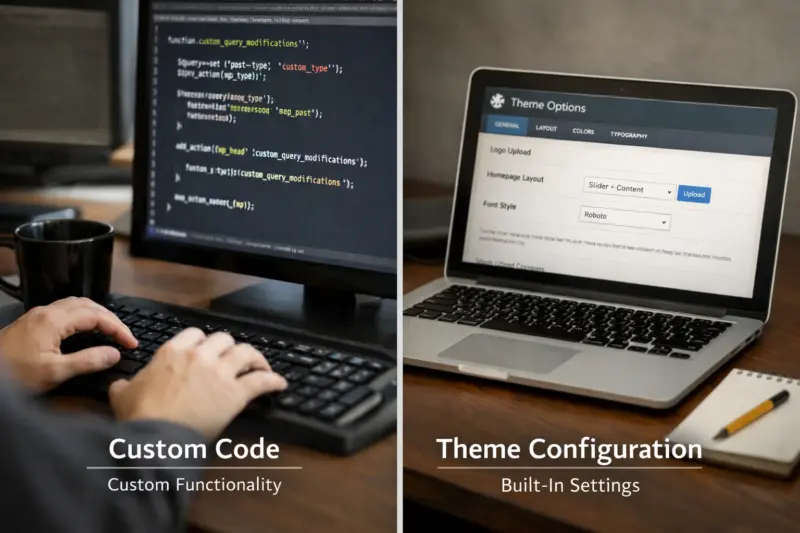
Custom work is code or engineered structure that changes how WordPress behaves. Configuration is what you set using built-in settings, theme options, or plugin controls. Many improvements can be achieved through configuration, and that can be safer and cheaper.
WordPress Customization should usually follow a hierarchy. First, try to use editor settings and reusable blocks. Next, use a child theme for targeted template or styling changes. Custom plugin work should be limited to features that cannot be achieved through blocks, configuration, or existing extensions.
For buyers, the key is to ask where changes will be made. Will the provider adjust a child theme only? Will they add a reusable block for a repeated layout? Or will they create new template logic that affects page rendering? When you understand the “where,” you can judge update risk.
A common misconception is that any look change requires custom code. Often, you can achieve brand updates with typography, spacing, and block styling. Custom code becomes justified when you need new behavior, like form routing rules or dynamic content logic.
Tradeoff: the more custom code you add, the more you inherit maintenance. That does not mean you should avoid customization. It means you should build it in modular, testable ways. Ask for a plan that explains what will be editable in the editor and what will require developer support.
Which WordPress customizations map to real business outcomes
Customization should connect to business outcomes, not just technical tasks. For example, conversion-focused pages need consistent layout, clear content templates, and reliable forms. Brand consistency needs reusable styling rules and predictable page structure.
Lead generation often improves when forms behave correctly. A provider can customize form layouts, validation messages, and submission routing. They can also connect forms to email marketing or CRM workflows. The result is fewer manual steps after a user submits a request.
Better user experience also matters. Providers can adjust navigation patterns, improve readability, and refine component spacing. They can also implement accessibility basics like keyboard navigation support and correct headings. This improves usability and can reduce support requests.
Meanwhile, operational outcomes matter too. If your team publishes new pages weekly, reusable templates and block patterns save time. Content template builds help your team publish faster without redesigning every page from scratch.
A real-world scenario: an agency site wants portfolio pages with consistent filters and featured media. A provider can create templates that reuse blocks and handle edge cases like missing media. A weaker provider might apply a one-off layout that breaks when content varies.
Also watch for “partial fixes.” A provider may style the homepage but ignore template consistency for inner pages. Ask how the customization plan affects the entire site, including archives, blog posts, and landing pages.

What deliverables to request from a WordPress customization provider
You should request deliverables that make progress visible and reduce launch risk. Good WordPress customization services typically include design references, development work logs, and a clear handoff package. Without these, it is hard to verify quality or maintain changes later.
Common deliverables include a staging URL, component list, and acceptance criteria. A component list can describe reusable sections like hero blocks, feature cards, and call-to-action areas. Acceptance criteria should state what must pass QA, like responsive checks and form submission tests.
Documentation also matters. Ask for short notes that explain where changes live, and how future edits should be done. For example, does a template use blocks or custom fields? If so, the handoff should explain the content rules your team should follow.
Quality deliverables can also include a QA checklist and test results summary. Even a brief summary helps you understand what was tested. It can cover broken link checks, form validation checks, and regression checks for existing pages.
Tradeoff: some providers bundle documentation as “included,” but deliver little detail. To avoid that, request the format. You can ask for a simple setup doc and a short “editing guide” for your editors.
Edge case: if your site is multilingual, deliverables should cover language-specific templates and metadata behavior. A provider should confirm how customizations affect localized pages. Otherwise, you may see inconsistent titles or broken language switching after launch.
How to choose the right provider for your WordPress customization goals
Start by matching provider capability to your specific goals. WordPress customization services vary widely. Some focus on theme styling. Others handle integrations, workflows, and editor-based component systems.
A practical fit assessment often starts with discovery. Then the provider should produce a requirements document. After that, they should propose a sample scope. The sample scope shows how they translate your goals into a technical approach.
Next, evaluate how they manage risk. Ask how they use staging, how they test, and how they plan rollback if something fails. Also ask what they will modify: theme files, a child theme, custom blocks, or custom plugins. Providers should explain tradeoffs, not just promise an outcome.
Selection criteria should include coding standards and plugin strategy. A strong provider aims to avoid overlapping plugins and fragile dependency chains. They also plan for updates, which reduces long-term breakage risk.
Common mistake: choosing purely by portfolio screenshots. Screenshots can hide update risk, and they can hide edge cases. Instead, ask for examples that match your structure. For example, if you need landing templates, ask about similar template work.
Also confirm communication cadence. You want a clear change approval process. If your provider does not discuss approvals, scope creep becomes more likely.
What the customization workflow looks like from discovery to launch
A professional workflow reduces surprises and protects your live site. Most WordPress customization services follow a predictable path: discovery, design alignment, development, QA, staging validation, and release. Each phase has different outputs.
During discovery, the provider clarifies goals, constraints, and content realities. Next, design alignment turns your brand direction into component rules. For example, they may define typography sizes, button styles, spacing rules, and card layouts. This becomes a design system for consistent builds.
Then development happens in controlled steps. A provider should build reusable components rather than one-off page hacks. They should also implement accessibility basics early. That keeps QA focused and reduces rework later.
QA should cover more than visual checks. It should include responsive verification and functional testing. Form validation checks matter, especially if you use custom fields or conditional logic. Regression testing also matters when your site already has key features.
Finally, staging validation and release controls prevent chaos. A provider should set up backups and use versioned deploys. After launch, they should monitor key flows. That includes page rendering, form submissions, and any integrations.
Edge case: existing content may not match new template rules. For example, if a template expects a featured image but your posts lack one, layout can break. A strong provider audits content patterns before launch. They also define how missing data should render.
Where QA, security, and performance checks fit in your WordPress customization
QA, security, and performance checks protect both users and your team. Customization can introduce bugs and slowdowns if testing is incomplete. It can also create vulnerabilities if input is not handled safely.
Performance checks should focus on what your changes affect. That usually includes page templates, added scripts, image handling, and layout behavior. A provider should verify that new UI effects do not harm Core Web Vitals. They should also confirm script loading patterns and avoid unnecessary libraries.
Security checks should include input handling for forms and dynamic content. For example, any form that collects user input needs proper sanitization and validation. Providers should also minimize custom code that duplicates plugin functionality. Less custom code often means fewer security surfaces.
Additionally, regression testing helps you avoid breaking existing features. When you change templates, you can affect navigation, archives, and metadata output. QA should confirm that page titles, descriptions, and canonical behaviors still match your SEO approach.
A helpful supporting reference is the WordPress developer documentation on security best practices WordPress Developer Resources. It covers themes and plugin development basics, including security-minded coding patterns.
Common mistake: focusing only on the homepage. Many issues appear on archives, tag pages, or search results. Ask the provider to test your real page types, including the ones your team uses daily.
Common misconceptions and pitfalls in WordPress customization projects
Many customization failures come from mismatched expectations. A common misconception is that a custom theme is always better. In reality, a child theme plus targeted template edits can be safer than a full rewrite.
Another misconception is that plugins solve everything. Plugins can help, but they can also overlap. Overlap increases maintenance and can cause style conflicts or broken settings after updates. A strong provider evaluates your current plugin stack before adding new ones.
Unplanned edits also create customization debt. If someone changes the parent theme or adds untracked custom code, future updates can overwrite your work. Over time, your site becomes fragile and harder to improve.
Unclear acceptance criteria can derail projects too. If your request is vague, the provider may deliver what they think you want. Then you discover mismatches during QA. That leads to rework and budget creep.
Deeper nuance: ask how they handle scope tradeoffs. A good provider will propose options and show what each option costs. For example, they may suggest an off-the-shelf block approach for speed. Or they may propose custom components for flexibility.
Edge case: you may have existing custom fields and template overrides. If your customization plan ignores them, new templates can display incomplete or incorrect data. A provider should audit these structures early.
Customization options and service models you can choose from
WordPress customization services can be structured in several ways. The right model depends on your risk tolerance and how fast you need progress. Most providers offer project-based and milestone-based development.
One category is theme and UX customization using a child theme and targeted template edits. This fits brand refreshes and template redesigns. It can also support layout changes that are difficult in the editor.
Another category is block editor-based customization using reusable blocks and patterns. This works well for teams that publish frequently. It also reduces maintenance when designed with editor workflows in mind.
Some projects require custom plugin or module development for specific functionality. For example, a unique filtering system or a specialized content workflow may need custom logic. Integration enhancements can also be part of customization, like connecting forms to email tools or CRMs.
Providers may offer retainer options for ongoing optimization and new features. Retainers can be useful after launch when you learn what users do. You can then refine layouts, add components, and improve conversion flows.
Tradeoff: hybrid approaches often work best. Many teams prefer mostly editor and block customization, plus only targeted code. This keeps the editor experience strong while still enabling custom behavior where needed.

How maintainability, updates, and documentation affect long-term success
Maintainability decides whether your WordPress site stays stable. Customizations should be update-safe by design. That usually means using child themes, reusable components, and modular code structures.
Documentation is a key part of maintainability. A provider should explain which parts are safe for editors to change. They should also clarify which parts require developer attention. That reduces accidental breakage by non-technical team members.
Compatibility planning also matters. WordPress updates can affect themes and plugin APIs. A good provider tests your setup before upgrades. They also define an update strategy and schedule for key components.
Performance maintainability is often overlooked. Providers should document performance-critical choices, like caching assumptions and script loading patterns. If those choices are undocumented, future changes can unintentionally slow pages.
Security maintainability matters too. If a provider adds custom code, it should follow secure coding patterns. The WordPress guidance on data validation and security helps, and it is a baseline for quality work WordPress Security.
Common mistake: treating customization as a one-time job. Your site will change after launch. The goal is a system your team can evolve safely.
Budgeting and pricing factors for WordPress customization services in 2026
Customization pricing varies because scope varies. In 2026, many buyers notice that estimates can range widely. That range usually reflects design complexity, feature depth, and QA requirements.
Cost drivers include the number of templates and components. Landing pages, archives, and header or navigation redesigns add work. Integrations also raise complexity, especially when data mapping and form validation rules are involved.
Custom code scope also affects pricing. A small tweak in the editor costs less than a custom plugin module with tests. QA time matters too. If your site needs regression testing for existing features, that adds hours.
Providers often price with discovery hours, design revisions, development milestones, and post-launch support. To compare quotes, ask what is included. Does the estimate cover staging testing, documentation, and training? Does it include content migration or only styling changes?
Realistic guidance: expect project budgets to scale from “small improvements” to “multi-template redesigns.” Many engagements fall into a broad range because each site’s structure differs. Ask for a phased estimate so you can fund the first milestone with confidence.
Edge case: if your site has heavy customization debt, the provider may need extra time to refactor. That can raise costs, even if the visible changes seem small.
How to evaluate credibility signals before you hire WordPress customization help
Credibility reduces risk when you customize a live WordPress site. Look for providers with relevant WordPress customization experience. You also want proof that they can manage edge cases, not just clean screenshots.
Ask for process artifacts. A good provider can share a sample QA checklist and describe how they test. They should also explain staging workflow and rollback controls. If they cannot describe these clearly, quality may depend on luck.
Communication signals also matter. Providers should have a clear cadence for updates and approvals. They should also use a ticketing approach for tasks and change requests. That helps you track what was built and what changed.
Struggling to get your WordPress site just right?
Transform your website with our expert WordPress customization services. Let us tailor your site's design and functionality to perfectly fit your brand and business goals.
Documentation quality is another credibility signal. You want a handoff that your team can use after launch. That includes what was changed, where it was changed, and how to edit safely.
Red flags include no staging workflow, unclear update strategy, or refusal to show logs and QA evidence. Another red flag is promising custom code without discussing maintenance. If they do not address updates, you risk recurring breakage.
A helpful third-party baseline for development expectations is WordPress plugin and theme review guidance WordPress Theme Handbook. It is not a contract, but it reflects what “good” looks like in the ecosystem.
How much do WordPress customization services typically cost and how are quotes calculated
WordPress customization services usually cost based on scope, complexity, and QA needs. There is no single price that fits every site. Your quote should reflect what changes, where they change, and how they will be tested.
Common quote components include discovery, design alignment, development, and QA. Integrations add cost because they require testing across systems. Template work adds cost because it can affect many pages and content types.
In many projects, ongoing support after launch also affects pricing. Some providers include a short support window. Others offer optional retainer work. Ask what is included in the final milestone and what is billed separately.
To get an apples-to-apples comparison, request a scope clarity checklist. That list should include components, templates, acceptance criteria, and dependencies. It should also state what is excluded, like content migration and analytics configuration.
Deeper nuance: “too cheap” work can be expensive later. Minimal QA can lead to launch bugs and costly fixes. Limited staging can cause surprises when your site has different data patterns in production.
If you want budget control, ask for phased delivery. The provider can deliver a base set of templates first. Then you fund the next milestone after approvals.
How long WordPress customization projects take from kickoff to launch
WordPress customization timelines depend on how much you are changing. A small brand refresh on existing templates can take less time than a full component system redesign. New integrations and custom modules usually take longer.
Most projects follow phases: discovery, design alignment, development, QA, staging validation, and launch. Discovery can include requirements and content audits. Design alignment often needs revisions, especially if multiple stakeholders review comps.
Development time grows with the number of templates and components. Editor and block customization can move faster in some cases. Custom plugin work can extend timelines because it requires careful testing and edge-case handling.
QA and regression testing add time, but they protect launch stability. Providers should test responsive layouts, forms, and template behaviors. They should also run regression checks for existing features you rely on.
A realistic planning range often looks like weeks for small upgrades and longer for multi-template redesigns. However, timelines vary based on your team’s review speed and how quickly content requirements are confirmed.
Edge case: if your site uses complex custom fields or multilingual templates, QA can take longer. The provider should validate data rendering and metadata behavior across languages or content types.
What should happen in staging before you launch WordPress customization work
Staging is where you verify changes safely. A staging environment mirrors your production setup, so you can test without risking live users. It also helps you catch data issues that do not show up in basic previews.
A strong staging process includes backups and a clear rollback plan. Providers should deploy changes to staging and then run QA checks. That can include visual comparisons, form submission tests, and navigation verification.
Staging should also validate real content patterns. For example, portfolios may have missing media or different post formats. Providers should test template behavior with your real data types and edge cases.
In addition, staging should confirm any integration behavior. If forms connect to external tools, submissions should route correctly. If you use analytics or tracking, verify scripts load as expected and do not double-fire.
Deeper nuance: staging is not just a “prettier preview.” It is a risk-reduction tool. Skipping staging often leads to rushed fixes after launch, which raises overall costs.
Ask the provider what they will test and what they will report. A QA checklist and a staging sign-off process are good signs of maturity.
How to choose between block-based and theme/template-based WordPress customization
Block-based customization focuses on reusable editor components. Theme and template customization focuses on how pages render. Both can achieve strong results, but they impact maintainability differently.
Block-based customization is great when your team publishes often. Reusable blocks can enforce consistent design without developers for every change. This fits marketing teams that need to update landing pages frequently.
Theme and template-based customization can be better for deep layout systems. It also fits complex archive designs, custom post rendering, and structured templates. When done carefully, it can still be update-safe through child themes and modular templates.
Choose based on your future workflow. If you want editors to do most updates, prefer block patterns and editor configuration. If you need specialized template logic and dynamic rendering, plan for template work.
Tradeoff: block customization can become unwieldy if you rely on one-off designs. Theme customization can become risky if changes are not update-safe. The best providers mix both approaches for stability and flexibility.
Edge case: if your site uses advanced custom fields, template-based customization can handle data rendering more reliably. Still, you can wrap that logic with blocks so editors manage layout, not code.
How providers manage scope changes during a WordPress customization project
Scope changes are normal, but the management approach matters. A good provider treats changes as controlled decisions, not silent edits. That protects your budget and reduces rework.
Change control usually includes documentation and approvals. The provider should record what changed, why it changed, and what it impacts. It should also estimate effects on timeline and cost before moving forward.
Practically, providers manage scope changes through an established review process. They confirm requirements, share updated plans, and seek your approval. They also keep acceptance criteria updated so QA stays aligned.
Another key is how they handle tradeoffs. If you add a new feature, something else may need to be reduced. For example, extra templates may delay integration testing. A mature provider explains these impacts clearly.
Common mistake is informal change requests. If your team says “just make it better” without references, the provider may interpret it broadly. To avoid that, request specific component rules, design references, and functional requirements.
Edge case: if the change affects template logic, existing pages may need updates. A provider should explain which pages and content types will be retested.
Frequently asked questions about WordPress customization services
What should I ask in a discovery call before hiring WordPress customization help?
Ask what will be changed and where those changes will live. Request a clear plan for theme versus child theme, block changes, and any custom plugin work. Also ask how they will test on staging and what acceptance criteria they will use for sign-off.
Finally, confirm how they handle your current setup. For example, ask how they will avoid conflicts with your existing plugins and templates.
How much do WordPress customization projects usually cost in 2026?
Pricing varies based on scope, template count, design complexity, and integration requirements. It also varies with QA and regression testing needs. A small style refresh costs less than a component system build plus new integrations.
To get a reliable number, request a phased estimate with clear inclusions and exclusions. Then compare quotes using the same acceptance criteria and component list.
Can I customize my WordPress site without breaking updates?
You can, but you need update-safe implementation. In many cases, providers should use a child theme for theme edits and avoid direct parent theme changes. They should also keep custom code modular so WordPress updates do not cause hidden breakage.
Ask for an update strategy and how they test after changes are deployed. Staging testing is a strong indicator of update awareness.
What deliverables should a professional WordPress customization service include?
Expect at least a staging URL, component or template list, and a QA approach. You should also receive documentation that explains what was built and how to edit safely. If forms or integrations were changed, ask for submission test evidence and notes.
Good providers also share a short handoff guide for editors, so your team can update content without breaking layouts.
Will customization affect my site speed or SEO?
Customization can affect speed if new scripts, heavy UI effects, or inefficient assets are added. It can also affect SEO if template behavior changes titles, metadata, or canonical logic. A careful provider tests performance-critical pages and validates template output.
Ask how they validate core template behaviors. For example, they should confirm that updated layouts still output correct headings and metadata patterns.
Do I need custom code, or can most customization be done with themes and plugins?
Often, customization can be achieved with themes, editor settings, and plugin configuration. Custom code is usually needed only when you require unique behavior or new workflow logic. A good provider explains which parts can be configured and which parts need engineering.
To decide, ask how they would implement your requested feature. Then evaluate whether the proposed solution is update-safe and testable.
How long does it typically take to customize a WordPress site end-to-end?
Timelines vary by scope. Small changes can take a few weeks, while multi-template redesigns with integrations can take longer. Delays often come from design review cycles and pending content requirements.
Ask for a phase plan with milestones for discovery, design alignment, development, QA, and launch. That helps you estimate realistic effort and review dates.
What’s the difference between a freelancer and an agency for WordPress customization?
A freelancer can be cost-effective for focused work, and communication may be direct. An agency can bring more coverage, especially for QA, design support, and integration testing. Agencies often have repeatable processes for documentation and staging workflows.
Your best choice depends on your scope. Larger projects with many templates and integrations often benefit from a team approach.
What should happen during staging before launch?
During staging, the provider should deploy changes and run QA checks before you approve release. They should test responsive layouts, forms, and key template behaviors with representative content. They should also confirm backup and rollback steps.
Ask what they will test and how issues are resolved. A staging sign-off process reduces last-minute surprises.
How do I choose between block-based customization and theme/template customization?
Choose based on who will edit after launch. If your team updates pages often, block-based customization can offer safer, faster editing. If you need deep template logic, theme or template customization may be more reliable.
Ask how each approach affects update safety. The best plan uses blocks and reusable patterns while keeping template changes update-safe.
How do providers manage scope changes during a WordPress customization project?
Good providers handle scope changes through documented approvals and updated estimates. They explain impacts on timeline and cost before starting new work. They also update acceptance criteria so QA stays aligned.
Ask how change requests are recorded. Clear change control reduces rework and keeps expectations steady.
How to plan next steps so your WordPress customization stays on track
To move forward, prepare a scoped brief that connects design and functionality needs. Include example pages, component references, and any must-have integrations. Then request a phased plan that shows what happens in each milestone.
Next, shortlist two or three providers and ask for the same scope questions. Compare their deliverables, staging approach, QA evidence, and update strategy. If one provider cannot describe those clearly, treat that as a risk signal.
Finally, set expectations with acceptance criteria. When you define what “done” means, you reduce rework. You also make launch safer for users and easier for your team to maintain afterward.
If you want a practical start, share your current page types and your desired improvements. Ask for a sample plan plus a phased estimate tailored to your goals and your existing WordPress setup. You will then be able to choose the provider that delivers the best mix of aesthetics and functionality.
Transform your website with tailored WordPress customization services.
Get a site that perfectly aligns with your brand and goals. Our expert team specializes in custom designs, UI enhancements, and seamless integrations that enhance user experience and drive conversions.
Request a Free ConsultationConclusion: choosing WordPress customization services that protect quality and maintenance
You should hire WordPress customization services that deliver predictable results, not just visual tweaks. When you understand scope boundaries, request clear deliverables, and insist on staging plus QA evidence, risk drops fast. You also gain a system your team can maintain after launch.
Use provider selection criteria that focus on how changes will be implemented and updated. Ask for update-safe strategies, documentation quality, and a clear acceptance process. Then you can compare quotes apples-to-apples and avoid customization debt.
Next steps are simple. Shortlist 2–3 providers, share a scoped brief, and ask for a sample plan with a phased estimate tailored to your goals. When you do that, you move from guesswork to a measurable, testable workflow.
Updated September 2026