

Custom plugins are built to match your business rules inside WordPress, not to force your workflow into a generic tool. In practice, custom WordPress plugin development services plan, build, test, deploy, and maintain the plugin so it fits your admin UX, data, and permissions. In 2026, plugin work also needs strong security, performance discipline, and ongoing compatibility planning as WordPress and PHP evolve. If you run a marketing team, a SaaS product, an ecommerce brand, or an internal product group, you usually need a precise workflow embedded in WordPress. This article helps you evaluate what the service should deliver, how to choose the right plugin approach, and how to reduce risk before you spend.
What custom WordPress plugin development services should deliver for your business
A solid service delivers more than “code that works” in a demo. It ships a maintainable plugin that matches your real WordPress workflows, data rules, and user roles. Off-the-shelf plugins can solve common needs, but custom work targets the gaps: unique business logic, specialized admin screens, or integrations tied to your specific processes.
Custom WordPress plugin development starts with outcomes you care about, like reducing manual steps, enforcing consistent data handling, and improving how customers experience key actions. For example, a custom plugin might automate lead routing from a WordPress form into your CRM, then create follow-up tasks based on product interest and user segment. Another common outcome is governed permissions, where only certain roles can publish, edit, or export records.
In a typical engagement, the provider covers the full service footprint: discovery and scope definition, architecture, implementation, QA, staging validation, production deployment, documentation, and optional ongoing support. You should expect clear handoffs, not just a zipped plugin file. Good vendors also plan compatibility work, even if the first release seems feature-complete. That includes dependency management, version testing, and update-safe design.
To fit your existing WordPress stack, the plugin must work alongside your theme, existing plugins, and hosting limits. That means the service should address dependency conflicts, database use, and how the plugin loads assets and hooks. Tradeoffs exist: deeper integration can reduce friction for users, but it can also increase maintenance effort. If you accept those tradeoffs upfront, your plugin is more likely to stay stable as your site grows.
One nuance many buyers miss is integration drift. Even if your plugin is correct, it can break when external services change API endpoints or data formats. The service should include monitoring and failure handling so the plugin fails safely and logs enough detail for troubleshooting. A common mistake is treating the integration as “set-and-forget” after go-live, then scrambling when real users hit edge cases.
A decision path to choose the right plugin approach (build, extend, or integrate)
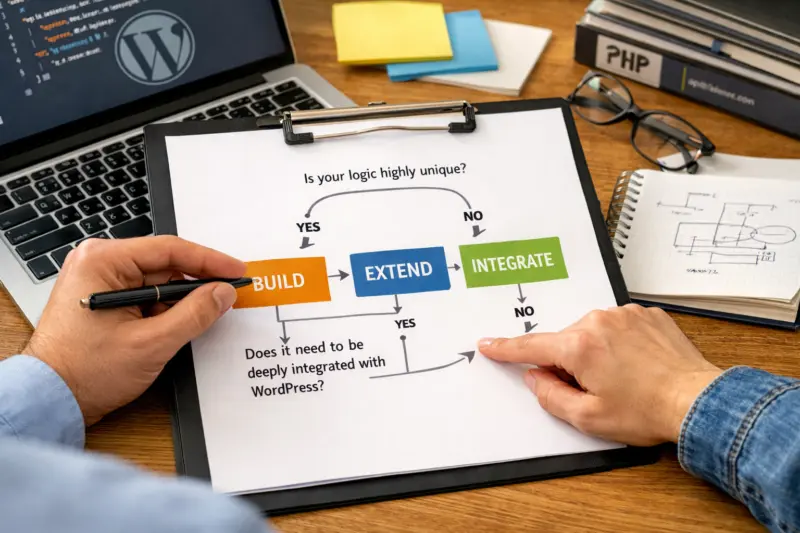
You should choose a plugin approach based on how unique your logic is and how tightly it must live inside WordPress. Most “best” answers fall into four categories: build from scratch, extend an existing plugin, integrate via APIs or webhooks with logic kept external, or use a hybrid setup. The right choice affects cost, risk, and long-term maintenance.
Building from scratch fits when your business rules are truly unique or when you need a specific admin workflow. Extending an existing plugin can work if the plugin already matches your data model and UI patterns, and the required changes are localized. API or webhook integration is ideal when the core system already exists elsewhere and WordPress only needs to trigger actions or display results. A hybrid approach often pairs a small WordPress plugin with an external service for heavy logic.
Decision criteria should be concrete. Ask whether your required workflow needs complex admin screens, role-based permissions, or custom reporting. Ask whether you must store data in WordPress to support exports, search, and editorial review. Also ask how strict your security posture is, especially around admin actions and sensitive fields. Tradeoffs matter : keeping logic external can reduce WordPress maintenance, but you may lose some native UX and rely on extra infrastructure.
Before committing, you should request a lightweight discovery output. A strong vendor can produce a feature spec, user stories, a permission model, a data schema outline, and acceptance criteria for each workflow. This prevents the “we’ll figure it out later” trap that often leads to rework. It also helps you compare build versus extend with fewer surprises.

Design your integration strategy to handle integration drift. For example, if an external API changes a field name, the plugin should validate payloads and surface a helpful admin error. A common mistake is writing strict parsing without graceful degradation, which can break bulk operations for certain customers. Good vendors plan for monitoring, retries where safe, and structured logs that make incidents actionable.
UNLOCK YOUR WEBSITE'S POTENTIAL
Transform your unique business needs into powerful custom WordPress plugins that streamline workflows and improve user experiences. Get a tailored solution that grows with you.
REQUEST A FREE CONSULTATIONEnd-to-end development process that reduces risk and protects your site
A risk-reducing process turns requirements into a plugin you can confidently deploy. The best services run from scope definition through staging validation and a controlled production release. They also include rollback planning so a bad release does not become a site emergency.
Start with requirements and scope definition, then move to technical design. Next comes implementation and QA test planning. After that, staging validation verifies behavior with your real themes, active plugins, and representative data. Finally, production release includes deployment checks and a short stabilization window where issues are handled quickly.
What “good” looks like at each stage should tie to business use cases. Acceptance criteria should map to real workflows, like how an admin creates a record, how editors review it, and how customers see the outcome. Code review practices matter too, since they catch security and correctness issues early. Clear handoff documentation helps your team maintain or troubleshoot the plugin later.
Environment strategy is also part of the service quality. The vendor should test with a realistic dependency set and match the PHP version and WordPress version your hosting uses. They should plan staging setup, because many conflicts only appear with your actual stack. Rollback planning is not optional when data or permissions are involved.
QA coverage should go beyond functional checks. Regression tests should confirm existing site behavior stays intact, especially around forms, caching, and admin pages. Compatibility checks should include active theme behaviors and plugin conflicts. A deeper nuance is performance sanity checks for hotspots, like heavy admin lists or bulk imports.
Security-by-design steps should be validated during QA, not assumed. Inputs must be validated and outputs must be escaped. Nonce or CSRF protections should be in place for state-changing requests. Capability checks must enforce who can do what, and the tests should verify that unauthorized roles cannot trigger privileged actions. A common mistake is focusing on “it works” but skipping permission tests, which can become a serious vulnerability.
Scope definition and specification that prevents expensive rework
Strong scope definition prevents rework by aligning business intent with what gets built. Your plugin scope should describe both the workflows and the data behavior, not just the feature name. When that is missing, teams often rebuild admin screens, permissions, or output formats after development starts.
A scope document should include admin screens, user roles and capabilities, configuration options, and edge cases. It should define the data model, including where data is stored and how it flows through events. It should also list dependencies, such as existing plugins the new plugin must cooperate with, and how the integration points work. This turns vague ideas into testable requirements.
To translate needs into technical requirements, the spec should outline event flows and ingestion rules. For example, if your plugin imports customer data, the spec should clarify how it handles duplicates, missing fields, and invalid formats. It should explain output formats, like which exports include which columns and how errors are displayed to admins. Practical application means you can write acceptance tests before code exists.
Boundaries must be explicit. Your spec should say what the plugin will and will not do, and where responsibilities end. If your plugin depends on another plugin for authentication or forms, the spec should state that contract clearly. Tradeoffs appear when boundaries are unclear, since vendors may add assumptions that increase ongoing maintenance.
Acceptance testing artifacts should also be part of scope. You want test cases tied to real workflows, sample datasets, and a definition of done for documentation and support. A deeper nuance is managing scope creep patterns. Reporting needs tend to expand, approval workflows evolve, and custom fields multiply. Many successful teams use phased releases so the first version delivers the core workflow without absorbing every possible future request.
Security, permissions, and data handling are central to custom plugin work
Security is not an afterthought in custom plugin development, because WordPress plugins can access powerful capabilities. A professional service builds security controls into every state-changing action and validates them in QA. It also designs safe data storage so you can recover and audit when problems occur.
At the WordPress level, capability checks should govern who can access admin pages and who can trigger actions. Sanitization and escaping must be applied to user input and output, especially when data enters HTML, SQL queries, or API responses. For secure AJAX or REST handling, nonce or CSRF protections should be enforced for state changes. Practical application means tests should confirm that a lower-privileged user cannot perform actions intended for admins.
Data handling expectations should be part of your spec. The plugin needs a clear choice between storing data in WordPress options, post meta, or custom tables. Options and meta can be simpler, but large datasets can strain performance and complicate queries. Custom tables can improve scalability and reporting, but they add migration and backup complexity.
Multi-user and role-based constraints should include least-privilege admin UI. Your plugin should not expose sensitive fields to roles that do not need them. Auditability may also matter, such as recording who changed what and when. A common mistake is using a single “admin-only” gate instead of fine-grained capabilities, which can frustrate legitimate users and increase support volume.
Operational safeguards should include structured error logging and safe failure messaging. If an integration call fails, the plugin should notify admins in a controlled way, not dump raw payloads. It should also log enough context for debugging without exposing secrets. Another deeper insight is supply-chain dependency risk: third-party libraries add attack surface. A reputable vendor documents and audits dependencies and keeps them updated with a clear update path.
Pricing and engagement models for custom WordPress plugin development services
Custom plugin pricing varies because scope, integrations, and quality gates vary. Most vendors use engagement models that map work to milestones or ongoing needs. You should expect quotes that explain what is included, what is optional, and how change requests will be handled.
Common engagement structures include fixed-scope project pricing, milestone-based delivery, time and materials, and retainer arrangements for incremental enhancements. Fixed scope works when the spec is stable and acceptance criteria are clear. Milestone pricing can reduce risk by tying progress to tests and staging validation. Retainers fit teams that need continuous improvements, bug fixes, and compatibility updates across multiple releases.
Pricing drivers usually include complexity of business logic, depth of admin UX, number of integrations, and testing rigor. If your plugin needs robust permission models and edge-case handling, that adds cost. If the plugin must support bulk workflows and large datasets, QA and performance testing also increase effort. Maintenance requirements are a major factor too, especially when WordPress and PHP versions change over time.
To evaluate cost-effectiveness, look at how the vendor defines quality gates. A cheaper build that ships without regression testing and documentation often costs more later. You should also confirm what updates are included, like WordPress and PHP compatibility work, and whether bug fixes are covered for a defined period. Clarify whether support includes incident triage for production issues or only best-effort help.
A deeper nuance is hidden cost risk from unclear ownership and missing deployment process. Without staging validation, rollbacks, and release checklists, teams often pay twice for the same issues. Another common mistake is “one-off dev style” code that works once but becomes costly to modify. Ask about documentation expectations, coding standards, and how your team will continue maintaining the plugin after the engagement ends.
Common mistakes and misconceptions that derail custom WordPress plugin projects
Many failures come from treating plugin development as simple coding instead of a full delivery of workflow, security, and maintainability. Your plugin needs admin UX, permissions, data correctness, and supportability for non-technical users. When those elements are ignored, rework becomes inevitable.
One common mistake is assuming a plugin is “just code.” If your users need to manage workflows, configure settings, and resolve errors, you need admin screens designed for real teams. Another mistake is starting development without a stable spec, which usually leads to rebuilt UI flows and permission logic. You cannot easily bolt on a correct permission model after the plugin touches data.
Compatibility constraints often derail projects. Themes can affect admin pages, and other plugins can change how forms, caching, or hooks behave. QA that only tests a clean WordPress install misses these realities. A misconception is “if it works now, it is done,” even though WordPress core updates and dependency changes will arrive.
Real-world bugs often surface only after real content volume and unusual inputs. Bulk imports can reveal validation issues that a single test record never triggers. Concurrent edits can show race conditions in saved data. These problems are avoidable with targeted test cases based on how your users operate the site, not how you imagine they will.
A deeper insight is that edge-case planning is part of professional scope, not extra. Ask the vendor how they test bulk flows, invalid data, partial failures, and permission boundaries. Then ask how they record and reproduce issues in staging. A strong team will treat these as standard deliverables, not emergencies.
UNIQUE PLUGIN DEVELOPMENT
Transform your WordPress experience with tailored plugins that fit your exact business needs and workflows. Let's turn your challenges into elegant solutions.
REQUEST A FREE CONSULTATIONPlugin development compared: in-house, agency, freelancer, or productized add-on systems
You can build custom WordPress plugins with different delivery models, and each changes accountability, cost predictability, and long-term governance. In-house teams, specialized agencies, freelancers, and productized add-on systems each fit different organizational needs. The best choice depends on your internal capacity and how critical the plugin is to core business workflows.
In-house development works when you have stable staffing and a clear ownership model for code, security, and deployments. Agencies often fit when you need specialist expertise and a defined delivery timeline with documented QA. Freelancers can be cost-effective for small, well-scoped work, but risk increases if knowledge transfer and documentation are weak. Productized add-ons can reduce initial build cost by using a base plugin, then adding your custom modules for unique logic.
Governance should be compared directly. Ask each option about code review practices, documentation standards, security testing, and how they handle plugin conflicts. Agencies and in-house teams often have stronger process maturity, while freelancers vary widely. Productized systems can help with maintainability, but you need clarity on how updates affect your custom modules.
Knowledge transfer is a key factor. You want training sessions, a clear repo structure, and operational runbooks for common support tasks. This reduces the bus factor, meaning your business is not dependent on one developer to understand the system. A deeper nuance is that even if a freelancer delivers quickly, without shared repo practices and documentation, continuity suffers.
Use a simple evaluation lens: where will accountability live after launch? If you cannot confidently answer who owns security patches, who runs updates, and who handles incidents, the delivery model is riskier than it looks. That question matters more for core workflows that touch customer data or permissions.
Advanced considerations that matter after launch in 2026: maintainability, compatibility, and support
After launch, the work is not “done,” because WordPress and PHP continue to change. In 2026, maintainability and compatibility planning are part of professional custom plugin development services. A vendor should define how they validate updates and how they handle bug fixes versus new features.
Support expectations should be explicit. Clarify severity levels, communication channels, and what qualifies as support work. Bug fixes for regressions should be treated differently from feature requests, which may require a new scope. Practical application means you can plan internal staffing for releases and avoid surprise costs.
Maintainability requires modular code structure and backward-compatible upgrades. When business rules evolve, migrations should be designed to handle existing data safely. That includes versioned schema changes, scripts for transforming stored data, and clear rollback strategies if a migration fails. A common mistake is adding fields or changing behavior without a safe migration plan, which can break admin views and exports.
Compatibility planning also needs a test matrix. Your vendor should test against relevant WordPress and PHP versions that match your hosting. They should run checks with your active themes and plugins to catch regressions early. Performance considerations matter too, especially for admin lists and bulk operations. The plugin should avoid slow database patterns and only cache where correctness is preserved.
A deeper nuance is planning for data migrations when business requirements shift. For example, if your plugin adds an approval workflow, permissions and stored states change. The vendor should provide a safe upgrade path that updates roles, transitions existing records, and logs outcomes. This prevents “half-migrated” states that lead to support tickets and operational confusion.
Frequently asked questions about custom WordPress plugin development services
How much does custom WordPress plugin development cost?
Pricing varies based on scope complexity, number of integrations, and how much admin UX you need. It also depends on QA rigor, staging/release workflow, and the amount of ongoing support included. A vendor quote often ranges widely because a small plugin with no external integrations can cost much less than a plugin with bulk workflows and strict role-based permissions. Ask for a milestone-based breakdown so you can see what each payment covers.
How long does a custom WordPress plugin development project usually take?
Timelines depend on how defined your requirements are, how many integrations are involved, and the QA and staging effort needed. A small plugin with a straightforward admin workflow may take a few weeks, while larger projects with complex permissions and data migrations often take several months. The timeline should also include time for regression testing against your current themes and plugins. Request a phased plan with milestones so you can evaluate progress and de-risk decisions early.
What should be included in a plugin specification before development starts?
A strong specification includes user stories, an explicit permission model, data flows, and UI requirements for admin screens. It should also define acceptance criteria for each workflow, including edge cases and error states. Your spec should outline dependencies on existing plugins and external services, plus expected input and output formats. Finally, it should include test scenarios tied to real tasks your team will perform.
Can you develop a plugin that works with our existing theme and current plugins?
Yes, but it should be handled as a compatibility plan, not a wish. The vendor should test with your actual active theme and other plugins in a staging environment. They should run regression checks to ensure existing behavior stays intact when the plugin is activated. If conflicts appear, they should document fixes and update the release plan accordingly.
Do you provide ongoing support and updates after launch?
Many services offer ongoing support, but you should clarify what it includes. Support typically covers bug fixes and compatibility updates for WordPress and PHP changes, while new features usually require a new scope. Ask about update cadence, how quickly issues are triaged, and what severity levels trigger faster response. Make sure the provider distinguishes support work from planned enhancements.
How do you handle security for custom WordPress plugins?
Professional teams implement capability checks, input validation, and output escaping in every sensitive area. They also protect state-changing requests with nonce or CSRF defenses and secure AJAX or REST endpoints. Security controls should be verified in QA with role-based test cases, not assumed. Vendors should also discuss how they manage third-party dependencies and keep them updated.
What are common data storage options for custom plugins, and when should we use each?
Custom plugins commonly store data in WordPress options for simple settings, in post meta for record-like data tied to content, or in custom tables for large datasets and complex queries. Options and meta are often faster to start, while custom tables can scale better for reporting and high-volume operations. The right choice depends on your querying needs, expected dataset size, and how often you need migrations. A good vendor will recommend a storage approach based on those constraints and describe the migration path.
What happens if the plugin needs changes after launch due to evolving business requirements?
Change requests should go through a controlled process so updates do not destabilize your site. The vendor should reassess requirements, define the impact on existing workflows, and propose a phased release with clear acceptance criteria. If changes affect stored data, they should include migration steps and a safe rollback plan. This prevents accidental breakage when new fields or rules alter how admins manage records.
Can custom plugins include admin dashboards for non-technical users?
Yes, and it is usually where custom work adds real business value. Admin dashboards should include role-based access, guided configuration workflows, and clear success and error messages. They often include export and import tools, plus filters or summary views that match how your team works. A strong plugin spec should cover the exact pages, permissions, and how users resolve issues.
What ownership and IP terms should we expect from a professional plugin development engagement?
Professional engagements clearly define code ownership, licensing expectations, and what happens to the repository or access after delivery. Many clients expect ownership of the custom code they commission, with documentation handoff included. The agreement should also clarify how third-party libraries are licensed and what that means for distribution. Ask for the exact IP terms in writing before development begins.
How do you test for compatibility across WordPress versions and different hosting environments?
Compatibility testing uses a test matrix that includes relevant WordPress versions and the PHP versions your hosting supports. The vendor should validate behavior in staging with your active theme and plugins, since conflicts often appear there. They should also test with your expected data volume and run regression checks for existing pages and workflows. When issues happen, they should reproduce them consistently and ship fixes through a controlled release process.
How a vendor should prove quality before you pay for custom development
You should evaluate quality through evidence, not promises. A strong vendor shows how they reduce risk with scope discipline, testing, security practices, and clear deployment steps. This matters because custom WordPress plugin development is an ongoing system that affects permissions, data, and user workflows.
Before paying for full development, ask for a reviewable plan: feature breakdown, milestone definitions, and acceptance criteria you can validate in staging. You can also request sample artifacts like a minimal admin UI mock, a permission model outline, or a QA plan that lists regression areas. Those artifacts tell you the team is thinking in workflows, not just features.
You can also verify quality by looking at how they handle edge cases in the spec. For example, ask how they plan for bulk operations, invalid inputs, missing configuration, and integration failures. A vendor that answers clearly can explain what tests will cover and how failures will be logged. Tradeoffs appear when a vendor refuses to plan edge cases, since those issues often become support tickets after launch.
Security validation is another quality proof point. Ask how capability checks, sanitization/escaping, and CSRF or nonce protections will be tested. In WordPress plugin work, core security guidance from the official developer documentation helps set expectations for safe practices, including nonce usage patterns and capability checks in admin flows WordPress Developer Resources. For data handling and database best practices, teams commonly reference the WordPress database API documentation and build queries through supported functions WordPress Database API. If the plugin includes REST endpoints, the REST API handbook can also guide correct request validation and routing practices WordPress REST API Handbook.
A common mistake is selecting a vendor based only on feature demos. Demos rarely show permission edge cases, integration drift, or regression risks from your existing plugin ecosystem. Choose a partner that can explain how they validate correctness end to end, and how they keep your plugin safe and maintainable after the initial release.
What custom WordPress plugin development services typically include in deliverables
Deliverables should be concrete and usable by your team. A custom plugin engagement should produce the plugin itself plus documentation, test evidence, and a handoff plan. This is how you keep ownership and reduce long-term operational risk.
Typical deliverables include a working plugin with configuration options, admin UI screens that match your workflow, and integration code that handles success and failure states. You should also receive documentation that describes setup steps, configuration meaning, and admin user expectations. Many teams also benefit from a short “runbook” describing how to troubleshoot common issues, such as missing API credentials or failed webhook processing.
Testing deliverables matter too. Ask whether the provider produces QA checklists, staging test notes, and regression results tied to acceptance criteria. If the plugin performs scheduled tasks or handles background processing, the service should document how those tasks run and how to monitor them safely. A deeper nuance is data migration documentation: if schema changes occur, you need clear steps and scripts so future upgrades are predictable.
Tradeoffs show up when vendors offer only minimal documentation and no test evidence. That can leave your team guessing when something breaks after a WordPress update. It also makes it harder to onboard new contributors later. Another common mistake is leaving ownership unclear, such as not transferring repo access or not clarifying licensing for any included dependencies.
To ground quality, look for how the vendor structures the deliverables. A mature approach often includes versioning, a changelog, and a deployment checklist that describes what gets tested before release. Those practices support maintainability and help your team trust future updates.
CUSTOM WORDPRESS PLUGINS FOR UNIQUE BUSINESS NEEDS.
Transform how your WordPress site operates with custom plugins tailored to your specific workflows. Our expert development services ensure seamless integration, high performance, and long-term stability, so you can focus on growing your business.
Conclusion
Custom WordPress Plugin Development Services are not just about writing features inside WordPress. They should cover scope discipline, security, permissions, testing, staging and production release control, documentation, and a maintainability plan for 2026-era WordPress and PHP changes. When you evaluate vendors by process quality and risk controls, you reduce rework and protect your site and users.
The decision path matters: build, extend, or integrate should be chosen based on how unique your logic is and how tightly it must live inside your WordPress stack. A clear spec with acceptance criteria and a well-defined permission model prevents expensive rework later. Ask for a milestone plan you can validate in staging, and confirm ownership, security testing, and update expectations before development starts.
If you are ready to move forward, request a discovery call and ask for sample specs and a QA plan. Also confirm what is included in support and updates so you are not surprised after launch. Then evaluate proposals by their acceptance criteria quality and risk controls, not only by feature lists.
Updated September 2026