

Full-Stack Web Development means you can build the full web application: the user interface, the server logic, and the database that powers it. In practice, Full-Stack Web Development covers how a browser page becomes data-changing behavior on the back end, then returns a consistent result. If you’re searching for a comprehensive, end-to-end roadmap, this guide walks you through the layers, the contracts between them, and the workflows that keep a project stable in 2026.
This matters because ownership across the stack improves product quality, debugging, security posture, and deployment success. When the same team designs the UI, APIs, and data model, fewer bugs hide in “handoff gaps.” You also get a clearer understanding of tradeoffs, like what must run on the client for responsiveness, and what must run on the server for safety.
Below, you’ll learn how full-stack projects are structured, what to build in front end and back end, how to model data safely, and how to design APIs that won’t break the UI. Then you’ll see how testing and deployment tie everything together, plus common mistakes and how to choose a realistic architecture.
How full-stack web applications flow from browser to database
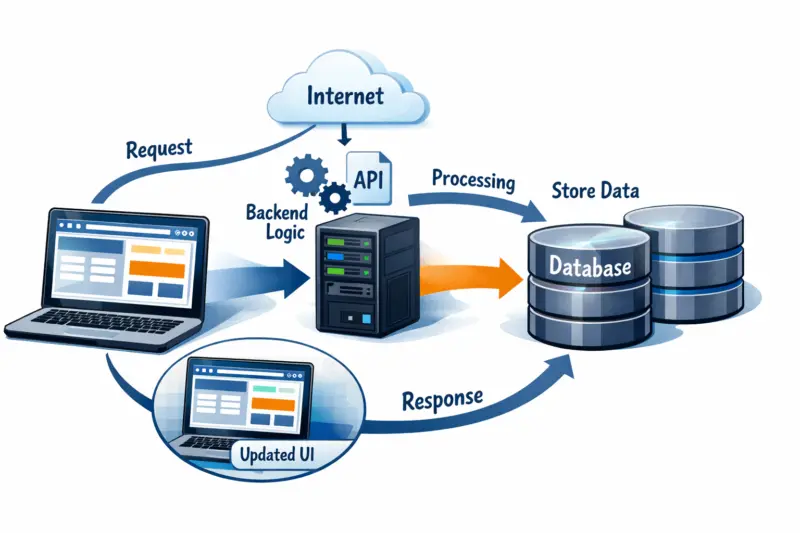
A full-stack web application is a pipeline that starts in the browser and ends in stored data, then returns a usable UI response. You can think of it as layers: presentation (UI), application logic (server), and data (database). Full-Stack Web Development is the skill of building and connecting every layer into one reliable system.
In a typical request lifecycle, a user action triggers UI code in the browser. That code sends an HTTP request to a server endpoint, often via the Fetch API or a framework client. The server routes the request to a controller or handler, runs business rules, then reads or writes in the database.
Next, the server validates inputs, applies authorization checks, and shapes the response. The response returns to the browser as JSON or another structured format. The UI then updates state, renders components, and handles success or failure in a way that matches user expectations.
Why this matters is consistency: the UI, server, and database must agree on meaning. A “missing field” error should show correctly in the UI, and it should also be logged with enough context on the server. A “permission denied” outcome must reflect real authorization logic, not just a hidden button.
How it works in practice is through shared contracts. API schemas and typed request/response models reduce drift between client and server. If the server expects a field named “email,” the UI should send it, and the response should return errors in a predictable shape.
Tradeoffs appear when teams blur boundaries. If the UI performs sensitive checks, attackers can bypass them. If the server leaves too much logic to the client, you risk inconsistent behavior across devices and browser versions. Real-world teams reduce this by putting sensitive rules on the server and keeping the client focused on interaction and display.
A common edge case is stale UI state after a failed request. For example, a user clicks “Save,” the server rejects the change, and the UI still shows “Saved.” A full-stack developer catches this by mapping server error responses to clear UI states, then designing forms to handle retries safely.
Front-end development skills that produce usable interfaces
Front-end development in Full-Stack Web Development focuses on building interfaces that feel correct, fast, and accessible. You create UI components, manage state, validate inputs, and display reliable feedback. You also connect those components to server APIs with predictable loading and error handling.
Mastering full-stack development transforms your web applications.
Integration of UI, server, and database leads to seamless user experiences.
Is Your Website Ready for a Comprehensive Overhaul?
Get Your Free ConsultationCore skills include component architecture and state management patterns. You define how data flows through the UI and how components update when a user interacts. For forms, you need field-level validation, accessible labels, and clear error messages that map to server responses.
Accessibility basics matter because the same interface must work for keyboard navigation, screen readers, and reduced-motion preferences. A full-stack approach helps here because you can ensure errors and success messages are exposed in a way that assistive technologies understand. You also avoid building UI that depends on fragile assumptions, like “the user always has JavaScript enabled.”
Integration fundamentals include consuming APIs and designing client behavior for edge cases. If an API call times out, the UI should show a retry option or safe fallback. If the server returns “unauthorized,” the UI should guide the user through re-authentication.

How it works with build output and production serving also matters. Front-end projects bundle assets and must align environment settings like API base URLs. The server must correctly serve static files and apply caching headers so users get stable performance without broken updates.
A deeper nuance is progressive enhancement versus “single-page only” assumptions. You should ensure key content can still load when JavaScript fails partially or delays. For SEO and accessibility, server-first rendering or hybrid strategies can improve resilience without forcing everything into heavy client logic.
Practical success criteria include component boundaries that make changes low-risk. You also validate performance budgets, like limiting expensive renders on large lists. Then you run accessibility checks and verify that interactive elements have clear focus states and labels.
A common mistake is trusting client-side validation alone. Attackers can bypass it, and users can still submit bad data due to browser bugs. In full-stack practice, you treat client validation as a user experience layer, not as security.
Back-end architecture and API patterns for maintainable server logic
Back-end development in Full-Stack Web Development means building reliable server logic that enforces rules and provides stable APIs. You handle routing, middleware, validation, and error responses. You also design how clients authenticate, authorize, and access resources.
Server responsibilities start with request handling. A good structure separates transport concerns, like HTTP status codes, from domain rules, like “can this user cancel this order.” You use validation to reject invalid inputs early and logging to capture enough context for troubleshooting.
API design patterns shape how your UI interacts with the system. Many apps use REST-style endpoints for resource CRUD operations, with pagination for lists and consistent response shapes for errors. You also consider idempotency for operations that clients might retry due to network failures.
Authentication and authorization must be treated as first-class design. Sessions and tokens both can work, but the important part is clear permission checks on sensitive operations. A full-stack developer ensures authorization happens on the server for every request that touches protected data.
How it works to avoid “fat controllers” is by moving business logic into service or domain layers. Controllers parse inputs and call domain functions, while persistence logic lives in separate modules. This separation reduces bugs and makes it easier to test without heavy HTTP setup.
Tradeoffs come from complexity. A microservice approach can spread logic too far if you do it prematurely, and it adds distributed debugging overhead. For many products, a modular monolith with clean boundaries gives most benefits without high operational cost.
In production, common failure modes include unhandled exceptions, timeouts, and leaky abstractions that hide expensive database calls. Instrumentation should capture request IDs, error stacks, and timing for route handlers. This lets you connect UI-visible failures to server logs and database performance.
A deeper edge case is inconsistent authorization across “nested” resources. For example, a user can access a comment only if they also own the post. If you forget that check in one endpoint, the UI may look correct for most users but still leak data to attackers.
Data modeling and integrity strategies that keep application behavior correct
Database and data modeling in Full-Stack Web Development are what make your app trustworthy over time. You choose the right storage model, define entities and relationships, and enforce integrity. Then you design migrations so schema changes do not break running features.
Many web apps start with relational data models because they express relationships and constraints clearly. Other apps use document or object-style models when the data shape varies widely. Your choice affects how you query, how you enforce consistency, and how you handle evolving requirements.
Data modeling essentials include defining entities, relationships, and indexes. Indexes support the queries your UI and API need, like sorting by created date or filtering by user. You plan schema evolution with migrations that add fields safely and backfill data without long downtime.
Integrity topics include constraints and transactions. Constraints catch invalid states early, like duplicate emails or orphaned rows. Transactions help keep multi-step operations consistent, such as creating a subscription and its billing record as one logical unit.
A deeper-than-obvious angle is designing for query needs early. If you model only the “write” shape, you may later struggle to answer “read” queries efficiently. Teams then face performance regressions from added joins, full scans, or awkward denormalization.
To judge a data model, evaluate real access patterns. Ask which filters, sorts, and aggregations the product requires at peak usage. Also consider growth projections, like increasing rows per user, to decide whether indexes or partitioning matter.
Tradeoffs show up in consistency versus scalability. Strong consistency can reduce edge case bugs, but it might require careful transaction design. Eventual consistency can improve throughput in some systems, but it demands UI patterns that handle temporary inconsistency.
A common mistake is ignoring concurrency. Multi-step operations can race when two requests update the same record. For example, two “confirm” clicks can create duplicate actions unless you add safe locking or idempotency keys.
API communication and contract design across the full stack
API communication is the agreement between the browser and server, and it is central to Full-Stack Web Development. Good contracts define request/response formats, error taxonomy, and how to evolve the API safely. When contracts stay consistent, the UI stops breaking during backend updates.
How it works starts with choosing endpoint conventions and response shapes. You decide how lists page, how errors represent field issues, and how the server signals success. Consistent structures reduce special cases in the client and speed up debugging.
Contract tooling can keep server and client in sync. Typed schemas and generated client types reduce mismatch errors, especially when you refactor. You also benefit when the same schema drives validation on the server and rendering logic on the client.
Security in API design is not just authentication. You validate input types and sizes, encode outputs, and avoid returning more data than the UI needs. You also implement rate limiting to reduce abuse and protect backend resources.
A deeper nuance is backward compatibility planning. If you add a new field, old clients should ignore it. If you change meaning, you typically add a new version or new endpoint behavior so existing clients do not receive incompatible data.
Practical outcomes include contracts for authentication flows, CRUD resources, and “real-time-ish” interactions. For example, you might support polling with endpoints that return updated state, or webhooks that push events to the server. Either way, the contract defines how the client detects changes and handles missed updates.
A common mistake is vague error handling. If the server returns different error formats per endpoint, the UI must guess. In full-stack practice, you unify error shapes so the client can show consistent messages and map them to form fields.
Authoritative guidance on how to think about API design and best practices often starts with platform documentation, plus security guidance from reputable organizations. For web security principles, review OWASP API Security and for general HTTP and web architecture, see MDN Web Docs: HTTP.
A reliable full-stack workflow ties development, testing, and deployment together
A reliable Full-Stack Web Development workflow makes changes safe from your first commit to production releases. You set up consistent environments, automated checks, layered tests, and deployment practices that support quick recovery. The goal is not just “ship,” but “ship without fear.”
How it works begins locally and becomes repeatable. You use environment variables to separate secrets from code, and you lock dependencies so builds stay reproducible. You also add linting and formatting checks so the team shares one code style and avoids accidental breakages.
Then you connect testing to continuous integration. Unit tests focus on domain logic and utilities. Integration tests check API behavior alongside database boundaries. End-to-end tests confirm the most important UI flows work end to end, like signup, checkout, or creating a core object.
Deployment conceptually includes staging and production separation. Staging mirrors production enough to catch issues like schema mismatch or missing configuration. For releases, you plan how to run migrations, and you decide whether to do safe rolling changes or “deploy then migrate” sequencing.
A deeper insight is that observability must span the whole stack. You want to correlate a single user action in the UI with the corresponding API request log and the database operations it triggered. Without correlation, debugging becomes guesswork, especially when problems appear only at scale.
UNLOCK FULL-STACK POTENTIAL WITH EXPERT WEB DESIGN
Transform your digital presence with custom website design and robust WordPress solutions that enhance your application's performance and user experience.
REQUEST A FREE CONSULTATIONTradeoffs appear with test time and pipeline complexity. A huge end-to-end test suite can slow every change. Many teams adopt a test pyramid, keeping most logic tests fast, while gating a small set of critical end-to-end scenarios in CI.
Real-world scenarios include failed migrations or broken configuration during deployment. Safe rollout plans include rollback strategies, forward fixes, and backward compatible database changes. If you design the API contracts and schema evolution carefully, you can reduce “deploy breaks everything” events.
A common mistake is running tests that pass locally but fail in CI due to environment drift. Seed data assumptions, missing environment variables, or different database settings can produce misleading results. Fix this by making local development use the same configuration shape as CI and staging.
Common mistakes and misconceptions that derail full-stack projects
Many full-stack failures come from mismatched expectations, not from lack of coding skill. Common issues include unclear boundaries, weak contracts, and postponing security and performance work. In Full-Stack Web Development, the stack amplifies both good and bad decisions.
One misconception is that full-stack means knowing everything equally. In practice, you build competence across layers while staying deep in the areas that matter most for your role and product. A useful approach is to develop broad enough understanding to debug issues and design interfaces, then deepen into specific domains.
A frequent mistake is blending UI, business rules, and persistence too tightly. If the same function decides authorization, updates the database, and renders a UI response, testing becomes painful. Refactoring then becomes risky because behavior is scattered across layers.
Skipping contract and validation rigor also causes repeated breakages and security risks. When endpoints accept inconsistent fields or return inconsistent error shapes, the client becomes fragile. Attackers also benefit when you trust client input or fail to normalize and validate data.
Performance and security failures often get treated as late-stage tasks, but they show up early in production traffic. For example, unbounded pagination can overload the database and cause timeouts. Missing authorization checks can leak data even if the UI hides the feature.
A deeper nuance is the “it works locally” trap. Local setups often use permissive CORS, caching, and database seed assumptions that do not match production. Configuration drift can turn stable behavior into intermittent failures once assets, proxies, or network conditions change.
Real-world scenarios include a form that submits fine with perfect manual testing, but fails for users with slow networks or different browsers. Handling retry logic, disabling duplicate submissions, and mapping server errors to precise UI messages prevents this.
A common edge case is the mismatch between displayed state and actual saved state. If the UI assumes success without checking the server response body, users see wrong information. Full-stack discipline means the UI trusts only what the server confirms.
Choosing a realistic architecture for complete web apps
Choosing an architecture is central to Full-Stack Web Development because it affects complexity, performance, testing, and team workflow. Different approaches help different constraints, like content requirements, security sensitivity, and time-to-market. There is no single “best” stack pattern for every product.
One common approach is a monolithic server-rendered web app approach. It often reduces the surface area because templates and server routes stay close together. It can also improve SEO and accessibility because key pages load with less client dependency.
Another approach is a SPA plus separate API approach. This offers strong separation and can improve UI iteration speed, but it requires careful API design and client-state complexity. You must also invest in accessibility, SEO strategy, and robust error handling when the API is unavailable.
A hybrid rendering approach combines server-first rendering for key pages with client enhancements for interactivity. It often balances resilience and user experience. You can ship useful pages even if some client features fail, and you can still build rich interactions where it matters.
Microservice-style decomposition can be helpful only when complexity justifies it. It adds operational overhead, versioning challenges, and distributed debugging. Many teams move to microservices later once they have clear evidence that a monolith’s boundaries cannot scale with modularity.
Tradeoffs change how you test and deploy. In a SPA, you might gate more UI tests because the client handles more logic. In server-rendered apps, you might gate more integration tests because HTML output depends on server behavior and data.
How to decide should start with constraints. If your product relies on content discoverability, prioritize patterns that support SEO and accessible rendering. If your app is highly interactive, plan for resilient client-server communication and predictable API contracts.
A deeper insight is that architecture choices should match team skills and debugging habits. If your team prefers clear logs and simple tooling, keep boundaries explicit and avoid unnecessary distribution. If your UI engineers need autonomy, invest in typed contracts and shared schemas.

Edge cases that decide whether full-stack apps succeed in production
Production success in Full-Stack Web Development depends on how you handle edge cases across UI, APIs, and data. These issues include security gaps, concurrency problems, and reliability under stress. Teams that plan for edge cases ship smoother releases and recover faster from incidents.
Security edge cases often involve authorization, not authentication. A classic issue is unsafe direct object references, where an endpoint uses an ID from the URL without checking the requesting user’s permissions. Another issue is missing authorization on nested resources, like accessing items through a parent object.
Data and concurrency edge cases also matter. Multi-step operations can race, and retries can create duplicate records if operations are not idempotent. Idempotency means repeated requests produce the same end state, which helps when networks drop and clients retry automatically.
Reliability under stress includes handling rate limits and timeouts across layers. The client should show useful messages when a request fails, and the server should respond quickly with sensible status codes. You can also design protective patterns, like limiting expensive queries and adding backpressure where needed.
A deeper-than-obvious angle is observability that correlates events across layers. When a user clicks a button, you need a request ID that travels from UI logs to API logs and down to database traces. Without this, debugging becomes slow and error-prone.
Real-world readiness includes measuring and setting quality gates. Track error rates by endpoint, latency percentiles, and database query performance. Run load tests for the critical flows and verify that the system degrades gracefully rather than failing catastrophically.
A common mistake is assuming “happy path” behavior represents production reality. Edge case handling costs effort, but it prevents costly incidents like data leakage, duplicate charges, or broken account flows.
For foundational security guidance relevant to web apps and APIs, see NIST Cybersecurity Framework as a way to think about managing risk across systems. For secure input handling and general application hardening patterns, consult OWASP Top 10.
Frequently asked questions about full-stack web development
What does “full-stack” mean for building a complete web application?
Full-stack means you build both the user-facing UI and the server-side logic that powers it. It also includes the data layer, such as designing database schemas and writing queries. In practice, you handle API contracts so the UI and server agree on requests, responses, and error formats.
Which skills should I learn first for Full-Stack Web Development in 2026?
Start with front-end UI fundamentals, like components, forms, and accessibility. Then learn API basics, including authentication concepts and consistent request/response handling. Next, focus on database modeling and data integrity, then add testing and deployment practices so your project stays stable.
How do I design an API that the front end won’t break?
Design consistent response shapes and a clear error taxonomy, so the UI can handle failures predictably. Use schemas and validation on the server, and align types or generated clients so request fields match. When you need changes, add fields safely and version endpoints for breaking behavior.
Is it better to use server rendering or a single-page application?
Server rendering often improves SEO and initial load resilience because key content arrives as HTML. A single-page application can deliver smooth interactions but requires careful handling for SEO, accessibility, and API failures. A hybrid approach often works well when you need both usable pages and rich client features.
What’s the difference between front-end state management and back-end business logic?
Front-end state management controls what the user sees and how the UI updates in response to actions and server results. Back-end business logic enforces rules and permissions, then updates data safely. A secure app always treats server logic as the source of truth for protected operations.
How should I structure my project so it stays maintainable as features grow?
Separate transport from domain logic, so route handlers do not contain every rule. Keep persistence code separate from business operations, and group modules by responsibility rather than by file type. Use clear boundaries so refactors do not break authentication, validation, or data integrity.
How do I test a full-stack app effectively without creating a slow pipeline?
Use a test pyramid: unit tests for domain logic, integration tests for API plus database boundaries, and a small set of end-to-end UI tests. Mock only where it reduces noise, and integrate where you need confidence in real contracts. Gate critical flows in CI so developers get quick feedback.
What are the most common security mistakes in web apps I build end-to-end?
Common mistakes include missing authorization checks on server endpoints and trusting client input for security. Another issue is inconsistent validation that allows unexpected data shapes into your system. Also watch for returning sensitive data in API responses or using insecure defaults for file or data handling.
Can I become job-ready in Full-Stack Web Development without working on a real project?
You can learn concepts without a job, but job readiness usually requires deployed work. “Real” means something that runs in production-like conditions with tests, migrations, and a working API. A portfolio that demonstrates reliability and security choices tends to stand out.
How do I handle database migrations and changes in production?
Plan migrations as backward compatible changes where possible, then add new code that uses them. Run schema updates with sequencing that avoids breaking existing endpoints during deployment. If you need rollback, ensure the migration strategy supports safe reversal or forward fixes.
Transform Your VisionInto a Reality
Unlock the full potential of your web applications with our expert full-stack development services. Let us create a fast, modern, and conversion-focused website tailored to your needs.
Comprehensive approach to full-stack learning and decision-making for success
Full-Stack Web Development succeeds when you connect UI, server logic, data modeling, and API contracts into one coherent system. You should treat architecture as a decision, not a guess, and you should back it with workflows for testing and deployment. This is how projects stay maintainable as features grow.
Think in terms of decisions you can explain: what belongs on the client versus the server, what contracts guarantee stability, and how database integrity prevents broken states. When you build with these boundaries, you reduce debugging time because errors become predictable. You also improve security because authorization and validation live where they matter most.
Then apply a production mindset early. Add observability, test critical flows, and design migrations that allow safe evolution. When problems happen, you want logs and traces that explain what went wrong and where, across the stack.
If you want a clear next step, start with one small end-to-end project concept. Map the required layers—UI components, server endpoints, data model, and API contract—then implement CI checks and basic deployment from the start. That approach turns learning into evidence, which is the strongest foundation for ongoing Full-Stack Web Development growth.
Updated September 2026