

If you want pages that are easy to crawl, easy to understand, and hard to break later, your URL structure must be predictable. A well-planned SEO Friendly URL Structure makes your site’s hierarchy clearer to users and search engines. It also reduces duplicate URL variants that can dilute relevance signals. In practice, you build a governed URL plan: naming rules, a consistent hierarchy, and a rollout method with redirects and canonicals. The result is fewer surprises during growth, migrations, and CMS changes.
What makes a URL structure “SEO friendly” in real-world crawling and indexing
An SEO Friendly URL Structure is one that consistently represents page meaning and avoids multiple indexable variants of the same content. “Friendly” does not mean “short only” or “loaded with keywords.” It means search engines can map URLs to your content types and relationships without guesswork.
Clean and descriptive URLs help crawling because they reduce ambiguity. When a URL path mirrors your site’s taxonomy and page intent, crawlers waste less time figuring out what each page is. Users also trust URLs that look stable and readable, which can improve engagement and reduce pogo-sticking.
How it works is simple: your structure acts like a taxonomy in URL form. For example, a path that follows your category and topic grouping signals how pages relate. That structure also supports internal linking patterns, breadcrumbs, and XML sitemaps. Even if you rely on a CMS for routing, consistent paths make canonicalization choices easier.
Practical application starts before you write content. Decide your content types and how they map to paths, such as informational pages, listings, or support documents. Then create rules for slug naming, hierarchy depth, and parameter handling. The governance matters because teams will otherwise change naming styles over time.
Tradeoffs appear when business labels or campaign names get baked into URLs. If your “descriptive” segment changes often, you will keep rewriting and redirecting. A common misconception is that any readable slug automatically fixes SEO. It does not if your site generates multiple indexable URL forms through filters, sort options, or tag and category combinations.
For real-world scenarios, consider an ecommerce-style catalog where filters create many URL variants. If you let every filter combination be indexable, your structure looks “pretty” but your index becomes noisy. A governed structure lets you keep the canonical path stable and control what becomes indexable. If you later need additional context, use query parameters or page content, not uncontrolled path variants.
Design principles for clean, descriptive URLs that scale with your site
Clean, descriptive URLs scale when they follow stable formatting and reflect real page meaning. You should be able to predict the next URL for a new page from a set of rules. That predictability is what supports long-term SEO Friendly URL Structure outcomes.
“Clean” means consistent characters and delimiters. Use lowercase, hyphens as separators, and avoid unnecessary tokens like duplicated words or random IDs. Remove stop-words only when you can do so without harming readability. Also avoid mixing styles, such as sometimes using underscores and other times using hyphens.
“Descriptive” means the URL segment describes the entity or topic, not a marketing slogan. Keyword stuffing fails because it can create URLs that do not match what the page actually covers. It also increases churn when marketing teams change their messaging. A better approach is to map URLs to your stable content model: category, topic, product or service, and supporting subpages.
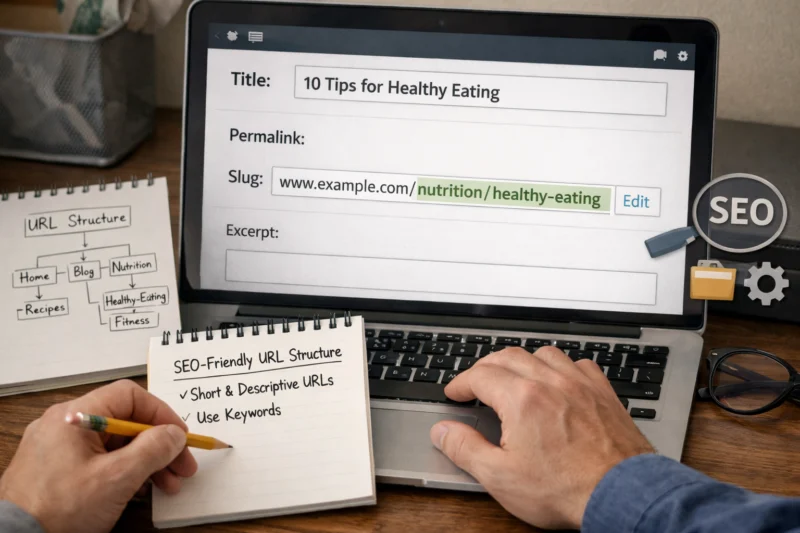
Hierarchy is where scaling succeeds. Use parent-to-child paths that mirror your taxonomy, such as a category segment then a topic segment then a content identifier. Depth should match how users navigate your site. If your navigation is shallow, deep URL paths can become confusing and inconsistent.
BUILD AN SEO FRIENDLY WEBSITE THAT CONVERTS VISITORS
Ensure your website's URL structure is clean and effective with our expert web design and SEO services. Let us help you attract more traffic and generate leads like never before.
REQUEST A FREE CONSULTATIONA nuanced scaling issue is coupling URLs to volatile business labels. Team names, seasonal campaigns, and temporary initiatives often change. When those labels enter the path, you create frequent rewrites, redirects, and canonical conflicts. Instead, base paths on stable taxonomy and keep campaign context on the page or in controlled parameters.
Failure modes usually look like inconsistency. Mixed casing creates duplicates on some systems. Pluralization drift creates near-duplicate paths that should be canonicalized. Changing slugs for existing pages breaks bookmarks and backlinks, and it forces redirect logic to carry the load.
A useful edge case involves regulated or legally versioned documents. In those cases, you may need version identifiers or revision dates in the URL. Even then, keep formatting consistent so users and crawlers see it as the same document series. If you do not, you risk splitting a single source of truth across many URL forms.
Build an SEO-ready URL hierarchy using site taxonomy and content intent
An SEO-ready URL hierarchy starts by mapping your site taxonomy to URL segments. You then align those segments with the intent of each page type. That alignment is the heart of a reliable SEO Friendly URL Structure.
Content intent is not just “blog versus product.” It includes whether pages serve as references, how-to guidance, listings, or support troubleshooting. A stable root for each content type helps. For example, an editorial site might use a dedicated path root for articles and a separate root for help documentation. This keeps the URL model understandable as your content expands.
Taxonomy-based paths are common in scalable websites. You can model URLs as category → topic cluster → page, such as “/category/topic/page.” This works well when categories and topics stay stable. If your taxonomy changes often, consider a content-type hub approach and keep the taxonomy deeper in the structure only when it is truly stable.
Shallow versus deep paths depends on how users find content. Shallow paths reduce complexity, but they can weaken the relationship cues between pages. Deep paths strengthen relationships but require strong governance to avoid depth sprawl. Use shallow paths for broad hubs and deeper paths for pages that clearly belong under a hierarchy.
Segment constraints are practical rules. Keep segments short and avoid random abbreviations. Decide whether to omit dates. If updates matter, consider keeping content updated on-page while the URL remains stable. When you do include dates, format them consistently and avoid changing them after refreshes.
Parameters and filters complicate hierarchy. If filter combinations create meaningful variants, you must decide which variants should be indexable. Most sites should keep filter URLs unindexed and let the canonical listing page represent the main intent. Otherwise, you generate duplicates that dilute relevance.
A deeper nuance is handling duplicates created by taxonomy combinations. Tags and categories can both generate paths for the same page. If both routes become indexable, crawlers may see multiple canonical candidates. A good structure reflects canonical intent by selecting one primary path pattern and controlling indexing for the alternatives.
Standardize slug rules and naming conventions to prevent duplicate URL forms
Slug standardization prevents duplicate URL forms caused by casing, characters, and inconsistent naming. A consistent rule set also reduces future migrations and rewrite requests. That is why slug governance is a core part of a SEO Friendly URL Structure.
Start with a canonical slug policy. Use lowercase letters, digits where needed, and hyphens for separators. Decide how to handle special characters, accents, and non-Latin scripts. For non-Latin slugs, you need a transliteration approach that stays consistent across languages, so the same entity uses the same slug policy every time.
Normalization is the next layer. Decide whether trailing slashes are always used or never used. Ensure the server behavior matches your canonical choice. Also define how percent-encoding should appear. If the CMS outputs different encodings for the same character, you can end up with multiple URL variants that should be treated as one.
Pluralization and synonyms create subtle duplicates. Choose one canonical form for category and service terms. Document exceptions where you must deviate, such as legacy naming that you cannot change. Teams often disagree on “service” versus “services,” and that mismatch multiplies URL forms over time.
Governance keeps the rules real. Assign owners who approve slug policy changes and who arbitrate conflicts between editorial needs and technical constraints. Enforce rules via templates or validation in the CMS workflow, not only in documentation. When enforcement is missing, manual editors will eventually produce inconsistent slugs.
An edge case is international storefronts and multilingual sites. Human readability may push teams toward translated slugs, while stability pushes toward consistent transliteration keys. If you mix approaches, you can create canonical drift across locales. Plan the policy at the start so every language follows the same enforcement mechanism.
A common misconception is that slugs are “only user-facing.” In reality, slug changes affect indexing, social sharing, and internal linking stability. If you treat slugs as flexible, you will repeatedly introduce duplicates through redirects and canonicals. The SEO Friendly URL Structure approach makes slugs stable and meaningful, even when page titles evolve.
Implement the URL plan with redirects, canonicalization, and internal linking rules
Implementation turns your URL design into consistent reality through redirects, canonical tags, and internal consistency. Without this layer, a SEO Friendly URL Structure can still fail during migrations and CMS updates. Planning the rollout is where most sites lose control.

A practical rollout starts with URL inventory and mapping. Export existing URLs, identify current patterns, and define target patterns for each content type. Then design a rewrite map that targets the new canonical paths. Only after that should you update navigation, breadcrumbs, and sitemaps, because changing nav first can expose unstable URL paths to crawlers.
Redirect strategy usually favors 301 redirects for permanently moved URLs. Use them to consolidate link equity and guide crawlers to the canonical path. Avoid redirect chains, where one redirect points to another redirect. Chains slow discovery and can increase the chance of mis-canonicalization.
Canonicalization controls duplicates when multiple URLs must exist. Use canonicals when duplicate content is unavoidable, such as when the CMS generates multiple views of the same entity. For alternatives you do not want indexed, prevent indexing via robots directives or noindex, depending on your setup. The key is that your canonical URL selection must match your URL hierarchy plan.
Internal linking consistency matters because it shapes which URL versions earn clicks. Make sure your UI components output the canonical path variant. If the CMS emits alternate URLs for the same page, configure it to prefer your chosen canonical variant. Even if internal linking is handled automatically, verify that breadcrumbs and sitemaps agree with the canonical path.
A deeper insight is how redirects and canonicals interact with crawl budgets. When you redirect thousands of URLs, crawlers must process that movement before they fully crawl new content. Plan staging so search engines can settle into the new pattern. Also watch for CMS-generated alternate URLs like sorting or facets, which can create additional crawl paths.
A common mistake is applying redirects but leaving old canonical tags behind. If old pages still declare themselves canonical, you send mixed signals. Another mistake is updating templates to output new links before redirects are in place. When that happens, crawlers may hit broken or duplicate routes during the transition.
Avoid common mistakes that break crawlability and undermine relevance signals
URL mistakes most often break crawlability by creating uncontrolled indexable variants and inconsistent canonical signals. These issues can undermine relevance even if each individual page looks correct. A strong SEO Friendly URL Structure design guards against these failure modes.
One common pitfall is changing URLs too often. If editors or developers feel free to revise slugs when titles change, you will generate redirect noise and duplicate variants. Another pitfall is inconsistent delimiters or casing. Some systems treat uppercase and lowercase differently, and mixed formats create multiple addressable routes.
Duplicate paths across tags and categories also cause trouble. When both routes index the same page, you split signals. You may also confuse users who land on one version and then see inconsistent breadcrumbs or navigation. The URL hierarchy should define one canonical path for each piece of content, and your indexing controls must follow it.
Uncontrolled query parameters can also undermine structure. Sort and filter parameters often create many combinations, and many of those should not be indexable. If you allow them, you increase thin pages in the index and dilute the relevance of your primary listing page. Instead, use query parameters for behavior while keeping canonical structure stable.
Dates in URLs can become misleading when you update older content. If you refresh a post but keep changing the meaning behind the date in the path, the URL implies an inaccurate timeline. If you remove or change date segments later, you must handle redirects carefully. In most cases, keep dates stable or avoid them unless your content model truly depends on publish timing.
Prevention matters more than post-mortems. Use a pre-launch QA checklist that tests normalization behavior, redirect correctness, and canonical selection for representative pages. Then run automated checks in staging to catch mismatched trailing slashes or encoding issues. Add tests for your redirect map so you avoid chains and loops.
A nuance many sites miss is that shorter URLs are not automatically better. A short URL with ambiguous hierarchy can be worse than a slightly longer but consistent path. Structure meaning helps both crawling and user comprehension more than raw character count.
Compare URL structure approaches and choose the right model for your content type
You can choose an SEO-ready URL structure model by matching it to how your site organizes content and how often your taxonomy changes. The “best” approach is the one that stays consistent. That consistency is what makes a SEO Friendly URL Structure sustainable.
Taxonomy-based paths are ideal when you have stable categories and topic clusters. A category or department segment provides context, while subcategory and page paths show relationships. This model scales well for editorial libraries and documentation where topics remain stable. It also supports structured breadcrumbs and easier user navigation.
Optimize Your Website for SEO Success
STAND OUT WITH SEO FRIENDLY URLS.
Ensure your website attracts more visitors with a structured, clean, and descriptive URL system. Our expert design and development services will enhance your site's visibility and performance, turning clicks into customers.
29+ Years of Experience Professional Web Solutions Satisfaction Guaranteed
Content-type hubs use stable roots for each page type. For instance, blog content can live under one root, support guides under another, and product or service pages under yet another. This approach reduces confusion when your taxonomy evolves. It also makes it easier to manage indexing rules by content type rather than by every possible taxonomy combination.
Flat versus hierarchical structures depends on predictability needs. Flat URLs are simpler to implement, but they can lose the meaning that a hierarchy provides. Hierarchical URLs add context but require stronger slug and taxonomy governance. If your team changes taxonomy often, hierarchical paths can become unstable unless you plan canonical and redirect behavior.
ID-based stability with human-readable slugs is useful when entity names change. A stable identifier prevents URL churn. Your slug can still be human-readable, but the underlying entity mapping reduces breakage when marketing or product naming updates occur. The tradeoff is complexity in routing logic and template design.
CMS constraints can force or discourage an approach. In many CMS setups, taxonomy routing and permalink settings affect how paths are generated for tags, categories, and custom content types. If your CMS cannot cleanly control canonical selection for facets and filters, you may need a different model or stronger parameter controls.
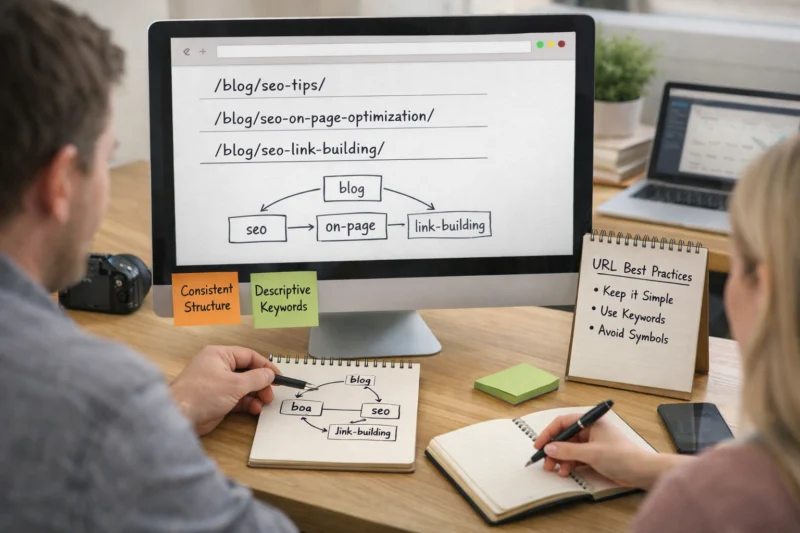
A practical hybrid model uses stable IDs internally and readable slugs externally. That reduces renames breaking links while keeping URLs understandable. Just be careful not to leak internal identifiers into the public path unless you have a clear policy for it. The goal is stable meaning, not stable system IDs.
To decide, evaluate taxonomy stability, number of pages, and the likelihood of renames. Also measure how your teams work: who edits slugs, who changes categories, and how often governance is bypassed. Your chosen model should make the default workflow produce compliant URLs.
Handle edge cases like multi-language URLs, migration constraints, and parameter-driven pages
Edge cases are where URL structure plans either hold or unravel. Multi-language routing and parameter-driven pages can create duplicates quickly. Handling them deliberately is essential for a SEO Friendly URL Structure that keeps working in 2026 and beyond.
Multi-language strategy starts with choosing how languages map to URLs. Common approaches include language prefixes in the path, separate subfolders, or separate subdomains. Whatever you choose, keep canonical relationships consistent across locales. Your canonical choice should reflect the same page in the same language, not a fallback language.
Encoding and transliteration rules matter for internationalization. Slugs for non-Latin scripts should follow a policy that teams and systems can reproduce. If your CMS changes transliteration rules when editors update content, you will create new slugs for the same entity. Plan for consistency by enforcing a slug policy in the editor workflow.
Migration constraints often block “perfect redesign.” You may have legacy URLs, vendor templates, or third-party links you cannot change. In those cases, enforce new patterns incrementally. Start by normalizing the most important content types and create redirect maps for high-value sections first. Then expand as you validate crawl and indexing behavior.
Parameter-driven pages require index control. Sort and filter combinations can create thousands of URLs. Decide which combinations represent unique user goals and which should remain unindexed. A typical approach keeps a canonical listing page indexed and blocks combinations that only change ordering or narrow facets.
A deeper insight is that documented consistency must translate into enforcement. If developers bypass slug rules in code, templates can generate alternate URLs that conflict with your policy. If plugins or theme components create additional canonical or alternate URLs, your governance must include those components. Audit the rendered URLs for each template and confirm they follow the normalization rules.
A common mistake is changing URL routing for language versions without aligning canonical tags. That can make crawlers treat different language pages as duplicates. Another mistake is redirect overload during migrations, where every old URL redirects to a single new page. That can create irrelevant landing pages and harm user experience.
Frequently Asked Questions About Building an SEO Friendly URL Structure
What is an SEO friendly URL structure and what makes it SEO friendly?
An SEO friendly URL structure is one that clearly represents page meaning through a stable hierarchy and consistent formatting. It also avoids multiple indexable URL variants for the same content by using normalization, canonical rules, and index controls. This reduces crawl waste and duplicate-page confusion for search engines and users.
In practice, you enforce predictable slug rules, choose one canonical path per page, and control filters and tags so they do not explode into many indexable URLs. You also keep trailing slash and encoding behavior consistent. The result is a structure that stays usable even when content titles change.
Should I include keywords in my URL slugs or focus on readability?
You should include terms that describe the page accurately, not keywords that repeat without adding meaning. Readability works when the slug matches what the page is truly about. If a slug repeats marketing phrases, it often becomes misleading and harder to maintain.
A good rule is to base slugs on stable entities and topics that users expect to . For example, a service page slug should reflect the service category and the specific offering. Then let the page content carry the broader topic coverage.
To avoid duplicates, pick one canonical path pattern for each article and control whether tag-based pages are indexable. Often, category pages serve as hubs, while tag pages act as navigation without indexing every combination. If both category and tag routes are indexable, duplicates can emerge.
Use consistent internal linking so your breadcrumbs, sitemaps, and navigation point to the canonical URL variant. When your CMS generates both routes, you can decide to noindex one set of pages or set a canonical to the preferred hierarchy path.
What’s the best URL depth for an SEO friendly URL structure?
There is no single “best” depth number. The right depth depends on your taxonomy and how users navigate your site. A helpful heuristic is to make the URL explain the page’s position in your structure without excessive nesting.
Shallow paths can work for small sites or content with few relationships. Deeper paths can be beneficial when categories and topics matter and stay stable. If deeper paths are unavoidable, keep slug rules strict so you do not produce inconsistent hierarchy segments.
Do trailing slashes matter for SEO, and how should I choose one?
Trailing slashes matter because they can create multiple URL variants if your server or CMS treats them differently. If both versions return content, crawlers may see duplicates. Choose one format and make the other redirect to it or avoid generating it.
Pick a canonical behavior and enforce it consistently across templates, redirects, and canonical tags. Then test using representative URLs for key content types. The goal is a single canonical variant for each page.
How should I handle date-based URLs when I update older content?
If you update older content, date-based URLs can become misleading because the path implies a publish or update date that may no longer reflect reality. One approach is to keep the original date in the URL and focus updates on the page content while preserving URL stability. Another approach is to move away from date-based paths, but that requires redirects and careful planning.
Before you change date formats, inventory existing URLs and define redirect rules so you do not lose links. Also make sure your canonical and internal linking choices reflect the updated strategy. This reduces churn and keeps the structure consistent.
How can I prevent slug changes from breaking backlinks?
Preventing breakage comes from treating slugs as stable identifiers. When a slug must change, use 301 redirects from old URLs to the correct new canonical URL. Also avoid redirect chains by mapping old paths directly to final destinations.
Before rollout, build a redirect map for the highest-trafficked and highest-linked sections first. Then stage the migration, validate redirect behavior, and confirm that canonicals and internal links match the new canonical paths. This helps preserve both user access and crawler understanding.
What’s the correct way to use query parameters for filters and sorting?
Query parameters are fine for filters and sorting when they represent user-driven behavior rather than unique canonical content. Many sites should keep most parameter variations unindexed and let the canonical listing or detail pages carry the SEO value. Canonical tags should point to the chosen base page variant.
Decide indexability based on whether a parameter combination creates a meaningful new goal. If it only changes order or narrows by irrelevant dimensions, block it from indexing. If you do index some parameter pages, keep them consistent and avoid generating near-duplicates.
When migrating a site, how do I plan redirects for thousands of existing URLs?
Start with a URL inventory and group pages by content type and intended destination. Then build a mapping that sends each old URL directly to the most relevant new canonical page. Use 301 redirects for permanently moved URLs and avoid redirect chains.
Validate your redirect map in staging using automated checks for loops, chains, and missing targets. Then roll out in phases, monitoring crawl and indexing results after each batch. This reduces risk and helps search engines settle into the new SEO Friendly URL Structure faster.
Multi-language URL structures affect indexing because each language version should be treated as a separate canonical entity. Your canonical tags must align with the correct language page, not a default language fallback. Your routing approach should ensure consistent language mapping.
Also ensure that your internal linking and sitemaps point to the correct language URLs. When you change language routing, validate canonical behavior for each locale. This reduces the chance of crawlers misinterpreting different languages as duplicates.
BUILD AN SEO FRIENDLY URL STRUCTURE
Elevate your website’s visibility and user experience with expertly crafted URL structures that enhance SEO performance. Let's create a system that attracts visitors and grows your business.
REQUEST A FREE CONSULTATIONConclusion
A strong SEO Friendly URL Structure gives your site a stable URL hierarchy that matches content intent. You do this with disciplined slug rules, a taxonomy-driven path model, and consistent normalization behavior. Most importantly, you implement redirects and canonicalization so changes do not fracture your index over time.
As a next step, audit your current URL patterns and identify where duplicates or parameter-driven variants are creating indexable clutter. Then define governance rules for future content so teams do not drift into inconsistent formatting. Finally, run a staged validation for redirect correctness, trailing slash behavior, and canonical selection before full rollout.
If you compare your current approach against the models discussed earlier, choose one that stays predictable as your taxonomy evolves. Document the chosen pattern for your team so new pages always follow the same hierarchy. That is how you build a URL system that remains reliable for growth, migrations, and CMS updates.
- Audit existing URL patterns and identify duplicate variants.
- Define and enforce slug and hierarchy rules in your CMS workflow.
- Plan redirects and canonical tags with a direct, chain-free mapping strategy.
When you follow that process, your URL hierarchy stays stable, your crawlers find the right canonical paths, and users see URLs that make sense. That stability is the foundation for an SEO Friendly URL Structure that can scale through new content types and future site changes.
External references that support these implementation concepts include guidance on canonicals from Google’s Search Central at Google Search Central and URL normalization and canonicalization behavior described in Mozilla Developer Network (MDN) for canonical link semantics. For redirect behavior, see MDN Web Docs: HTTP Redirects to understand how status codes differ in practice.
Updated August 2026