

Color in web design can shape attention, perceived trust, and user emotion in ways that directly affect clicks and conversions. That is why color psychology in web design is more than taste. Your brains read visual signals fast, even before users understand your message. This guide explains how to apply color psychology responsibly, then measure results with real tests. You will also learn the common traps that make beautiful palettes underperform. Color meaning is probabilistic, so you will see how context changes outcomes across audiences, devices, and brands.
Contents
- 1 How color psychology works in the first seconds of a user’s visit
- 2 Mapping emotional goals to practical color roles in the interface
- 3 A decision path for applying color psychology without guessing
- 4 Common misconceptions and color pitfalls that break web performance
- 5 Choosing a color strategy approach for different goals and team constraints
- 6 Handling deep edge cases: culture, contrast conditions, and “what users really see”
- 7 Applying color psychology to conversion moments and key page sections
- 8 Understanding color psychology in web design FAQ
- 8.1 Does color psychology apply equally to all website visitors and cultures?
- 8.2 How do I choose CTA button colors that encourage action without hurting readability?
- 8.3 What’s the best way to test color changes without confounding other page updates?
- 8.4 Why do our high-saturation brand colors sometimes reduce conversions?
- 8.5 Can using red or green for success and errors backfire in UI design?
- 8.6 How does dark mode change the emotional impact of colors on a website?
- 8.7 What role does contrast ratio play compared to “emotion” in color psychology?
- 8.8 How should marketers coordinate brand guidelines with UX-driven color semantics?
- 8.9 How can I handle color psychology when my content uses photos with unpredictable tones?
- 8.10 What are the most common color-related accessibility failures in modern web UI?
- 9 Conclusion: use color psychology as a measurable system, not a palette guess
How color psychology works in the first seconds of a user’s visit
Color psychology influences how people interpret your website’s intent and hierarchy. Users do not experience color in isolation. They experience it next to contrast, spacing, typography, and content.
Two mechanisms drive most effects. First is perception: contrast and salience help the eye spot key elements. Bright or high-contrast areas often feel more “important” because they stand out. Second is association: people learn color cues through branding and category norms. For example, many users learn that certain blues signal reliability through repeated exposure.
Web behavior follows those interpretations. A page can look calm or urgent based on color temperature, saturation, and how “busy” the interface feels. That tone can change whether users read, compare options, or act on a call to action. Color also affects trust, partly because readable interfaces feel safer. When text and controls are easy to distinguish, users tend to feel more confident.
Context matters because interpretation is relative. The same color can signal “help” on a neutral background, but “warning” beside strong red error patterns. A hero section might create excitement, while a form area needs clarity and restraint. Deeper nuance comes from learned versus stable effects. Some associations vary by category, but readability and visual hierarchy are more consistent.
A common mistake is treating one hue as a single emotion. People see multiple signals at once, like icon style, button shape, and microcopy. If your CTA color suggests action, but your page copy is unclear, the color cannot fix the message. If you want deeper context, pair this with practical guidance on on-page SEO best practices, because clarity in content and hierarchy work together.
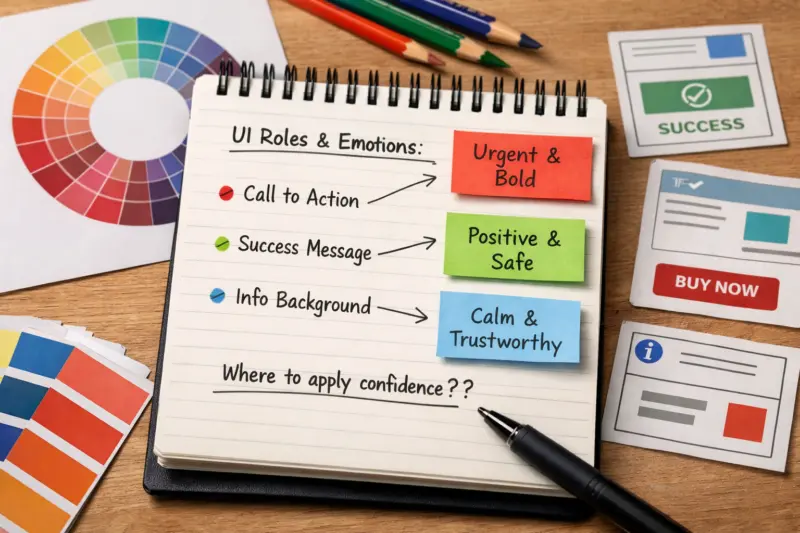
Mapping emotional goals to practical color roles in the interface
Color psychology becomes useful when you translate emotions into specific UI roles. Instead of asking, “What color feels confident?” you define where confidence needs to show up. That usually means backgrounds, text, borders, links, alerts, and CTA buttons.
Start with the psychological job each role performs. Background and surface colors control calm versus focus. Text and border contrast control readability and “legibility trust.” Links and accents guide scanning toward the next step. Error and validation colors reduce uncertainty by signaling what happened and what to do next. When you treat roles as semantics, your palette becomes coherent across the whole product.

Then handle UI states with the same intent. Hover and focus states should reinforce interaction without harming accessibility. Disabled states should communicate limitation while still keeping controls understandable. Validation states should be consistent across forms, including inline messages and summary banners. A palette that only works on the default screen often fails when users tab through controls or encounter errors.
Tradeoffs appear when you pick “one color for one feeling.” Users receive multiple simultaneous cues, so harmony beats dominance. For example, a high-saturation CTA can feel exciting, but also increase perceived noise if everything else is saturated. A more reliable approach is to keep reading surfaces stable and use accents to guide attention. This reduces cognitive load and helps the interface feel intentional.
Edge case: the same brand color may not work across roles. A brand red might suit a thin logo element but not a warning banner with long text. Another nuance is semantic consistency. If error uses bright red everywhere, users learn the rule quickly. If success, info, and errors vary by page, users spend effort relearning meaning.
A decision path for applying color psychology without guessing
A good process turns color psychology into decisions you can justify and test. You can do this with a step-by-step workflow that connects user goals to UI outcomes. It also forces you to validate accessibility before optimizing emotion.
First define goals and audience context. What does this page ask users to do next: learn, compare, sign up, or complete a purchase? Different moments need different emotional tones. A pricing page often needs clarity and calm comparisons. A confirmation screen often needs reassurance and closure.
Next identify the emotional and behavioral outcomes you want. You may aim for faster scanning, higher perceived credibility, or reduced anxiety in forms. Then shortlist candidate palettes and map them to roles, like surface, text, borders, CTA, and alerts. At this stage, do not pick colors as “vibes.” Pick them as solutions to specific UI problems.
Validation should start with accessibility checks. Contrast is a prerequisite for emotional cues to work at all. When users cannot read, they may interpret the page as risky or confusing. The Web Content Accessibility Guidelines explain contrast principles and related requirements in Web Content Accessibility Guidelines (WCAG) — those standards help you avoid basic failure modes.
Then measure with controlled experiments. A/B test one change at a time when possible. Isolate the CTA color, then later isolate hero background contrast or link styling. Track engagement and conversion behaviors, like CTA clicks, scroll depth, and form start versus completion. Mixed results often come from confounds like traffic source differences or seasonal campaigns, so compare like with like across segments.
Limitations matter. You can find correlation, but not every test proves causation. Still, iterative testing helps you learn what the audience responds to on your site. When results conflict, use hierarchy and legibility wins first, then refine tone. This keeps color psychology grounded in usability rather than subjective preference.
Common misconceptions and color pitfalls that break web performance
Many teams fail because they assume color psychology is universal. Color effects depend on category norms, brand familiarity, and user expectations. They also depend on whether users can read and operate the interface comfortably.
The biggest misconception is “red equals urgency for everyone.” Users may interpret red as urgent in many contexts, but your UI context can shift meaning. A red badge might mean “new” in one brand system, while “error” in another. If users see red for both promotions and failures, they may stop trusting the meaning system.
Another common pitfall is relying on saturation alone. A saturated accent can look exciting, but it can also increase visual noise. That noise can steal attention from your main message. If the page feels busy, users may skim less and bounce more often.
Contrast mistakes also hurt conversions. Beautiful palettes can still underperform if body text, small labels, or input borders lack contrast. Focus styling can also be undermined by styling choices that remove outlines or blend focus rings into the background. For accessibility-focused color choices, use the WCAG contrast guidance referenced earlier.
Edge case: color-only communication. If your UI uses only color to indicate errors, users with color vision deficiencies may miss the message. The fix is redundancy through text, icons, and clear labels. Another nuance is the “trust color” debate. Some teams chase hue to feel trustworthy, but trust usually comes from multiple signals like layout quality, content clarity, and credibility markers.

For marketers, the failure mode can be over-optimizing the CTA color while the page’s value proposition is weak. If users do not understand the offer, they will not click just because the button is bright. Color should support the message, not replace it.
Choosing a color strategy approach for different goals and team constraints
You can apply color psychology with different strategy approaches depending on your budget and maturity. The key is to choose a system that prevents random changes and keeps semantics consistent. Otherwise, your colors drift and your meaning breaks.
Brand-led palette systems prioritize consistent identity across pages. They help teams stay aligned, and they are often faster to deploy. The tradeoff is that brand colors may not map cleanly to semantic states like error, success, and focus. You may need careful adjustments to ensure accessibility and consistent behavior.
UX-led semantic systems define colors by meaning and UI state. In this approach, error is always error, and focus is always focus, even if accents change. This reduces cognitive load because users learn stable rules. The limitation is governance: someone must maintain the rules across components and templates.
Data-led iterative palettes optimize via testing. You may start with a semantic system and then adjust accent tones to improve engagement. This approach fits teams that can run experiments and interpret results carefully. The risk is experiment churn, which can cause inconsistency if you do not guard the core semantics and contrast targets.
Content-led approaches tailor palette decisions to the page’s imagery and tone. This can work well for media-heavy sites, but it needs guardrails. If your palette changes too often, users lose the meaning consistency that makes interfaces feel predictable.
Draft: optional comparison table in this H2
In practice, many teams succeed with a hybrid. Keep semantic roles stable for readability and state meaning. Then experiment with accents and CTA styling within safe contrast constraints. If you want a companion discipline, pair this thinking with guidance on design systems and UI component consistency, because governance determines whether color rules survive real production.
Handling deep edge cases: culture, contrast conditions, and “what users really see”
Color psychology gets complicated when the real world changes how colors appear. Ambient lighting, screen calibration, and display profiles shift perceived brightness and temperature. That can turn your intended emotion into something flatter or harsher.
Cross-context variability is real, but you should treat cultural meaning as a starting hypothesis. Many users learn hue associations through repeated media and category patterns. Still, exceptions appear often, especially across industries and global audiences. The safest approach is to validate with your audience rather than relying on generic color charts.
Perception limits also matter for accessibility. Color vision deficiencies can reduce the difference between hues you assume are distinct. Red versus green can become hard to separate, so you must rely on semantic labels, icons, and text. Low-vision and glare conditions also reduce contrast sensitivity, so your palette needs strong legibility, not just “looks fine.”
Imagery adds another edge case. Photos, gradients, and overlays change contrast dynamically. A CTA might sit on a bright area of a hero image on desktop, then shift behind a darker overlay on mobile. Color psychology should account for real composition, not ideal swatches.
A practical way to debug color underperformance is to check the non-color causes first. If your palette test fails, it could be insufficient contrast, unclear hierarchy, or a confusing message. It could also be an experimental setup issue, like changing copy at the same time. If you isolate variables properly, you can learn whether color is the lever or whether usability gaps are the lever.
One misconception is to treat perceived color problems as “screen issues only.” Many issues come from CSS overlays, transparency stacking, and font rendering that changes contrast. You can reduce these risks by using consistent overlays and testing on representative device settings.
Applying color psychology to conversion moments and key page sections
Color psychology should support the specific intent of each page section. Conversion moments depend on confidence, clarity, and reduced uncertainty. The right colors can guide scanning and reinforce what the interface wants users to do next.
In a hero section, color supports the value proposition and directs attention to the primary CTA. If the hero background is too busy or the CTA blends into the design, users may not notice the action. If the CTA stands out with a readable contrast and clear hierarchy, users feel they understand the next step. When the CTA area sits near different content blocks, its perceived importance can change, so test the color in the real layout.
Social proof sections often need “stability” colors. Calm surfaces and readable text help users trust what they are reading. If review cards use harsh gradients or low-contrast text, users may feel the page is low quality even if they like the offer. Pricing blocks benefit from clear comparisons, where emphasis uses accents consistently. A feature highlight color should not conflict with error semantics.
Forms and checkout steps are where color can either reduce anxiety or create it. Success and confirmation messages should feel reassuring, while error messages should be unmistakable and specific. Progress indicators and step labels should use color carefully, because users make mistakes when they cannot interpret state. Validation colors should work even if users ignore hue and rely on text and icons.
Edge case: “trust color” overcorrection. Some teams push toward darker, muted palettes to feel premium, but that can reduce contrast if typography shrinks or light text is used. Trust is not just hue. Trust signals include clear microcopy, predictable layout, and credible information. Color should reinforce those signals, not replace them.
Marketers should coordinate with design when campaigns change tone. A new offer might shift hero imagery and messaging, which can change contrast behind your CTA. Rather than randomly updating brand colors each campaign, use a controlled system where roles stay stable and only approved accents vary.
Understanding color psychology in web design FAQ
Does color psychology apply equally to all website visitors and cultures?
No, it does not apply equally. People bring different category norms, brand associations, and expectations, which change how hues are interpreted. You can reduce the risk by validating with your own users through usability checks and small color tests.
Start with contrast and legibility, then use a color that clearly differentiates the CTA from surrounding surfaces. Define CTA hover, focus, and disabled states so meaning stays consistent. Finally, test by measuring CTA clicks and form starts, not just visual preference.
What’s the best way to test color changes without confounding other page updates?
Change one element at a time, such as CTA background color, link color, or alert styling. Keep copy, layout, and imagery constant during the test window. Also segment by device and traffic source when you analyze results, since these can mask color effects.
Why do our high-saturation brand colors sometimes reduce conversions?
High saturation can increase visual noise and pull attention away from the primary action. It can also reduce readability if text contrast is insufficient. If your UI uses saturated accents across many components, users may feel the page is harder to scan.
Can using red or green for success and errors backfire in UI design?
It can, especially if red and green do not map cleanly to error and success across all states and regions. Cultural associations also differ, and some users cannot distinguish hues. Use semantic consistency plus text or icons so meaning does not rely on color alone.
How does dark mode change the emotional impact of colors on a website?
Dark mode changes contrast behavior and perceived temperature, which can alter how “warm” or “alarming” a color feels. Colors often need role-based adjustments instead of simple inversion to keep text readable. Test key states like focus rings, error banners, and CTA emphasis in dark mode.
What role does contrast ratio play compared to “emotion” in color psychology?
Contrast ratio is a prerequisite for emotional cues to land. If users cannot read text or detect controls, they may interpret the experience as unsafe or unclear. Emotion and meaning work best after basic legibility is solid, so prioritize accessible contrast first.
How should marketers coordinate brand guidelines with UX-driven color semantics?
Marketers should define goals and campaign intent, while UX defines semantic roles for UI states and readability. Keep the semantic system stable and treat brand accents as controlled variables that fit within accessibility constraints. Establish governance for who approves color changes to prevent color drift.
How can I handle color psychology when my content uses photos with unpredictable tones?
Use overlays or gradient layers so the CTA and key text sit on predictable contrast zones. Keep transparency controlled, because it can change contrast across images and screen sizes. Test with representative imagery from your real content library, not only a best-case photo.
Common failures include using color alone to communicate errors, using insufficient contrast for small text, and hiding focus outlines. Inconsistent state colors also create confusion for keyboard users and screen readers. Fixing these issues usually improves both accessibility and conversion performance.
Conclusion: use color psychology as a measurable system, not a palette guess
Color psychology in web design works through context-driven perception, and it should become functional UI decisions. When you translate emotional goals into specific color roles and UI states, users experience your site as clearer and more trustworthy. That clarity often shows up as better scanning, fewer form errors, and higher action rates.
Most teams get better results by following a method instead of choosing “nice” colors. Define goals and intent, map color to roles, validate accessibility, and then test isolated changes with analytics. This approach helps you learn what your audience actually responds to, including device and environment differences.
Nuance matters most where it connects to trust and usability. Contrast and legibility are prerequisites, semantic consistency prevents meaning drift, and imagery requires contrast strategies. If you want a practical next step, run a controlled experiment on a high-impact conversion moment like the CTA, a form validation pattern, or a pricing emphasis color.
If you audit one section first, pick the place where users make decisions under uncertainty. Apply a semantic color system approach so states like error and success remain stable. Then measure results with a clear before-and-after plan, using the same page and audience conditions where possible.
Updated September 2026